
Table of Contents
Pre v9.1 Change log And Downloads
Looking for the current release? The versions on this page are historical and no longer supported please visit:
Download XTension 9.5.5
The changelog for releases prior to 9.1 is stored in it’s entirety here.
XTension is updated regularly, there is a new release almost every week but rarely any reason to force you to upgrade unless you see a new feature or supported device that you would like to use. These are not like the untested “daily” builds that some online projects do automatically which may not even run at all. These are XTension releases that you should feel confident in installing. For earlier OS versions or to upgrade from versions prior to build 854 please visit the Previous Version Download Page By downloading this software you agree to be bound by the end user license agreement.
Latest Version: 9.0 (build 947) 11/29/2016
download: XTension v9.0 (build 947) (11/29/2016) NOTE: this version requires at least version 3.5 (build 082) of XTdb: Database and Graphing to use the new database and graph features.
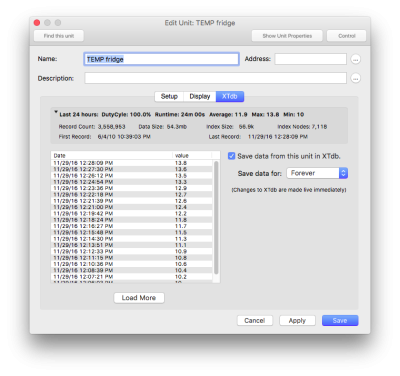
- NEW: XTdb: Database integration with the Edit Unit Dialog. There is a new pane of the Edit Unit Dialog window which displays the most recent changes to the units value or state. You can also control if the unit is actually saved to the database and for how long from this window without switching to XTdb and searching for the unit there.
- NEW: XTdb: control clicking on any graph in an XTension view will bring up an option to “edit this graph” which will bring XTdb to the front and display the edit dialog for that graph. A very nice shortcut for making changes without having to switch apps and find the same graph again in the menu and then hit the edit menu.
- NEW: Database “meta” units can be created. It is now possible to create units that are based on calculations of a units previous values in the XTdb database. From the Interface popup in the Edit Unit Dialog you can select “XTdb” as the interface. That will give you a list of unit types of: Average, Duty Cycle, Duty Cycle of the Last Cycle, Hit Count, Minimum Value, Maximum Value, and Runtime. When this is selected the unit options pane will have controls that will let you select the unit on which you want to run the calculation, how long ago to start the calculation and how often you wish to recalculate it. Duty Cycle of the last cycle and hit count are also recalculated when the linked units value changes. These units can then be graphed in XTdb or added to views or displays like any other unit.
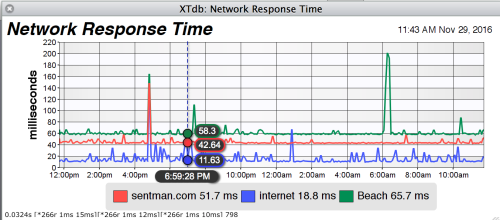
- NEW: If you have selected a data line to save mouse over data for in the new version of XTdb then when that graph is displayed in XTension or in the XTension web interface the mouse over of the data value and time will display as you mouse over the graph.
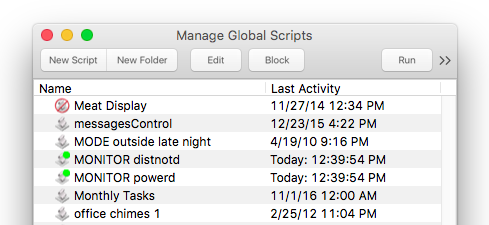
- NEW: Global Scripts that are Blocked will display the blocked script icon in the Global Scripts menu as well as the Manage Global Scripts window.
- NEW: Global Scripts that have a running idle callback timer will show in both the menu and the manage scripts window with a green indicator.

- NEW: The Log window will go back to live scrolling at the bottom if you leave the window scrolled up but unattended for too many minutes. This was the default behavior of the classic version that never worked quite right in the OSX version of XTension. This way when you return to your machine later it should always be showing the most recent events rather than having been scrolled to the very top of the log window.
- NEW: If you wish to handle the reception of a command to a group and not have XTension automatically pass the command to all members of a group you may return true at the end of the ON Script or OFF Script handler for the group. This tells the group that you have handled the command processing and the command that caused the group script to run will not be passed on to the group members. This could be useful if you wanted to have groups that were really scenes and wanted to control the level of the different group members yourself rather than just have the on or off command be sent through.
- FIX: If you alter the members of a Group via the AddUnit or RemoveUnit verbs within the groups ON or OFF script the group will still process all it’s units or pass the received command on to all the units that were there when the command was received. Previously if you changed the group members from the ON script then not all might have gotten the command passed to them.
- In the Edit Script dialog pressing the tab key is somewhat smarter. If you hit tab when there is no quoted string behind the cursor then it will enter a tab character into the script as you’d normally expect from a word processor. This is good for managing code indentation and such. If you hit the tab key after starting a quote then any characters you have already typed will be used to bring up the unit autocomplete popup and scroll to the closest hit to what you began typing. This is how the tab key worked in the past, but it is useful to be able to enter tabs as well. You can enter a tab at any time by holding the option key down when you press it.
- FIX: In the Edit Script dialog using the auto-comment/uncomment menu shortcut would not work on lines that included the applescript line continuation character. Autocomment/uncomment now works for any script character content. Did you know you can hit command-‘ (command single quote) to comment or uncomment the line your cursor is in? Use it after selecting an entire block of text to comment or uncomment the entire block!
- FIX: Global Scripts with an idle timer running would not update their display of their last activity date if the manage global scripts window was open when they ran. They now update as they run.
- The Attachments script now has a nice script icon in the Manage Global Script.
- FIX: Scripts that are inside of folders properly display and update their icons when they are blocked or unblocked or start or stop an idle timer. This fix fixes incorrect icon displays in both the script menu and the manage global script window.
- FIX: Fixed a bug with “simple” dimmable Vera units where they might have had their ON script run twice and been immune to the “with no script” option when creating events. Vera units are now all treated as smart under the hood which they are and will remember their previous state. The with no script option now works for events created to control dimmable vera units.
- FIX: Barix 1-wire devices can once again return a negative temperature reading. This was a problem that crept in due to the 64 bit conversion at some point.
- FIX: Fixed a problem with the Weeder card configuration setup that would stop evaluating once it had processed a Thermocouple interface. Thermocouple interfaces can now be included anywhere in the weeder chain rather than just at the end and will operate properly.
- FIX: The Front Window verb will once again take the name of a View and open it’s window for you. Note: you do not have to prepend the term “View:” in front of the view name unless you want to bring to the front a window that is already open. Just pass the name of the View itself.
- I increased the timeout for assuming an interface has connected properly to 30 seconds from 5. Back when a serial port would be available or not the interfaces would fail pretty much immediately if there was one missing. With so many things connected via networks now it can take longer for an interface to realize there is no device at that address. Previously if the interface too longer than 5 seconds to fail the retry count would reset to 0 and you might never get the total failure event as it would keep resetting it’s retry count. As long as the interface realizes the device is not responding within 30 seconds now the retry count will continue to count down and you’ll get the total failure call to the interface error script and be able to alert yourself to a problem or take other scripted actions to handle it. This may still not catch every instance though, if problems remain please let me know.


Version: 8.9.4 (build 946) 10/21/2016
download: XTension v8.9.4 (build 946) (10/21/2016)
- FIX: Units for which a target can not be found are no longer added to lists as “offline unit” they are just ignored until the target is connected.
- FIX: Fixed problems with editing scripts on 10.7 and 10.8. These OS versions are supported again and should work fine for this release though this may be the last version for which they can be supported.
- JSON: the JSON server is more robust in talking to Locatives server. Some duplicate hits may still have snuck through with the previous builds. This version actually stores a history of the locative hits for each unit you setup and will ignore any duplicates that are received. This means that you may still receive duplicate previous hits immediately after loading this new version but as it learns the timestamps of those previous hits it will get better and better at ignoring them and after 2 or 3 enter/exit cycles you should see no more repeats.
- JSON: the JSON server is also more forgiving of slow network connections and waits longer to dispose the network endpoint. If sending a reply through a slow network connection or to a very busy server the success message might have been cut off with an error making the server think that we had not handled the connection.
- Sierra: for the moment I’ve disabled the Sierra feature of opening new windows in tabs if you hold the option key down. This was making any script you opened for editing from the alt menu item of the script menu open in a tab of whatever the frontmost window was since you had to hold option down to get the alt menu for editing as opposed to running the script. If you’d like to edit scripts in tabs it’s possible I can re-enable this specifically for you in the future let me know.
- FIX: non local units like the ones created by video pitcher for video stream status and recordings couldn’t have scripts added to them immediately after creating with an error happening, it was necessary to quit and restart XTension once before they would allow scripts to be added. This is now fixed and you can add scripts or unit properties to a non-local unit regardless of when it was created.
- FIX: “sort timeout” errors are no longer logged if the list window sort was triggered automatically by a change in the unit value.
- FIX: the xUnit applescript class previously treated every access to its interface property as if you were trying to set it. Now if you’re getting the property it will properly return the name of the interface to you as expected.
- NEW: Added the ability to set the xtID property of the xUnit AppleScript object in addition to just reading it. This is so that automatically created non-local units like the video stream units created by Video Pitcher can be swapped with existing units without having to go to a lot of trouble to re-arrange other things already referencing those units. If you don’t know exactly why you would want to be able to do this then you probably shouldn’t mess with it as it could cause all sorts of difficult to sort out issues if used incorrectly.
Version: 8.9.3 (build 945) 10/4/2016
download: XTension v8.9.3 (build 945) (10/4/2016)
- FIX: other sorting problems with strange characters in the list windows should no longer be able to cause a hang.
- FIX: fixed a potential crash when opening a script from the global find window. The script windows no longer use the system find “Panel” window but instead use the find bar at the top of the script text area for search and replace within a script window.
- FIX: Several more applescript errors now return proper error messages rather than just saying “event not handled“
- FIX: An error and stack trace is no longer logged if you try to use the Create Event verb with a unit or script name that doesn’t exist. Instead a proper error message is returned to the script.
- NOTE: The problems editing AppleScript's under OSX versions 10.7.5 remain in this build. If you’re still stuck on that OS version please do not yet upgrade to this build. Until I can address those in a future bug fix release, 10.7 machines should stay at build 943 or earlier. XTension version 8.9.x will be the last that officially supports 10.7.5.
Build: 944 (8.9.2) 9/23/2016
download: XTension v8.9.2 (build 944) (9/23/2016)
- FIX: fixed the chance of a program hang when sorting a unit list window by address descending.
- FIX: reduced cpu usage when doing things like the delay verbs that you shouldn’t be using anyway. This should reduce or eliminate the logging by the system that we’re using “excessive wake ups” sometimes.
- FIX: removed a recursive appleevent object lookup that might have been the cause of some other hangs. You can’t pass an object to the log anymore without getting garbage though. You’ll need again to specifically add the “as text” to the end of such log lines to get them to work.
- NEW: if you write log with a list or a record you’ll now get a human readable script formatted version of them instead of the low level object code or chinese characters that would have previously displayed had you tried to write an apple script record to the log.
- NEW: I’ve noticed that the geofencing app Locative will sometimes re-send the previous alert after sending you a new one. This version of the JSON server attempts to filter those out so you should much more reliably get enter/exit events if you were previously having trouble with getting an enter event immediately after getting the exit event and so forth. This only applies to the new locative specific handling as outlined in the 8.9 (942) version and will not help if you are using the individual direct calls to the unit. You must upgrade to the new specific locative handling if you wish to benefit from this.
- NEW: If the Locative hit contains a timestamp that is older than the current second, which it sometimes does if the request is delayed due to network or iPhone considerations, the timestamp that is sent to the unit in XTension will match the time of the actual event and not when the command was received.
- FIX: If you quit and restart XTdb while a web page or a View is displaying a graph it will now properly start updating the graph display again. Previously it would not show new data unless you closed and re-opened the View or page.
- FIX: When creating a new global script the parent relationship with the attachments script is set properly allowing you access to any global properties that you have set in the attachment script. Previously new scripts were created without this and so any attempts to get to a global property would result in an error.
Build: 943 (8.9.1) 9/9/2016
download: XTension v8.9.1 (build 943) (9/9/2016)
NOTE: this version of XTension requires at least build 82 of Video Pitcher
- first version to be released in a signed DMG file format. This makes it more compatible with the upcoming Sierra release of OSX.
- New: added a toolbar to the edit unit dialog. The first button is for “find this unit” which will start a search for that unit and show you everywhere it’s being used or referenced. The second button is the “show unit properties” button that I moved into the toolbar from where it was down below making more room there for unit specific controls later. The last button is for “control” which lets you quickly open the standard HUD control window for the unit from the edit unit window rather than having to go back to a list and find it again.
- New: added “make new list from selection” and “make new group from selection” items to the contextual menu in the list window. Select a group of units, control click and select one or the other.
- Fix: for the overly enthusiastic Vera “Available” unit. It would sometimes report that the vera had gone unavailable when in fact it was just asking XTension to refresh the REST connection to it.
- New: if there is an actual error when connecting to the Vera and the Available unit is turned off it will add the error codes to unit properties in the Available unit. Making it easier to see what the last error was than going back through the logs. There are 2 kinds of errors possible. A TCP error “last tcp error” which is an error code from the networking layer and an HTTP error “last http error” if the request was accepted but the vera itself returned an error other than the data expected.
- Fix: in list windows control-clicking again works to bring up the contextual menu. The trackpad gesture or the right click always worked.
- Fix: in list windows page up, page down, home and end keys work again for navigating the list.
- Fix: holding the shift key down while navigating the list via the arrow keys selects additional units instead of just moving the selection.
- Fix: X10 devices now properly show their type (powerline, wireless, security) if “show device type” is turned on for the list window instead of just “N/A” as they showed before.
- New: hitting the tab key in a list window will bring up the contextual menu for the selected item easier navigation without a mouse. You can then navigate the menu with regular arrow keys as well.
- Better keyboard control for the HUD windows. Since you can bring them up with the left arrow key in a list window it makes sense that you then wouldn’t have to grab the mouse. Hitting enter will send the new value entered in the value field, you can navigate between the segmented controls via the tab key and then the arrow keys to select the button you want. To select the button you have to press the space bar, not the enter key. That is the OSX behavior of the control and nothing I can easily change even though it seems totally wrong.
- New: Added an application applescript property for “log caching” if you’re suffering a crashing or hang problem and you’re not seeing the offending command or action in the log because it wasn’t written yet when the program went away by turning this off you force a flush of the log file with each write. DO NOT turn this on just for fun or for any other reason but to debug a crashing problem as you will not like the much slower performance of the app when it has to wait for the log to write each time.
- Fix: If you were finding a phrase in a script and the phrase was at the very start of the script it would fail to highlight properly when the window was opened from the find window. It now highlights correctly.
- Fix: fixed a potential for errors or even a crash to be logged when switching from the find window to opening a new script window.
- Stopped using an OSX “find” field in the find window as it was not showing the focus and flashing cursor showing you could type in it when you first opened the window. The new field doesn’t have the magnifying glass to the right in it, but actually works properly.
- Fix: It’s very difficult to test but I believe that I’ve fixed at least one way that an interface could open and fill the log with known header errors forever rather than just starting up. This was such an unusual thing to happen I’ve never trapped one when testing, but I did fix a logical error in the parsing code that might be responsible for it under some strange networking conditions.
- Fix: The Scheduled Events window once again honors multiple selections when suspending or enabling events. For a while now only the first event in the selection was processed.
- Fix: Fixed a problem with the new list windows where if you had unprintable characters in your unit description that it might crash when it tried to display them. Now it once again just displays the diamonds with question marks in them as you would expect. Why you would have such things in a unit description I don’t know, but if you do then this fix is for you.
Build: 942 (8.9) 8/28/2016
download: XTension build 942 (8/28/2016)
NOTE: this version of XTension requires at least build 82 of Video Pitcher
- Connections to the RFX controllers will send a ping to the devices regularly to verify the connection and reconnect if necessary.
- NEW: Entirely new native list implementation for all list windows. You can now do standard things like drag the columns around to change the layout of the window. The old “edit layout” sheet is now gone and all changes are done by control-clicking or right clicking in the control or through the new “View” menu controls. To hide or show different columns control-click or right click on the headers portion of the list. For standard unit controls control-click or right click on the unit in the list.
- All drawing in the lists is now via more modern system calls so things like shadows render much better than they did previously. The list is looking very nice.
- CHANGE: in the Edit Icon sheet window when choosing an icon from the list you can drag the icon to the on or off state display which is easier to understand than the previous behavior of selecting the state display and then double clicking an icon in the list.
- NEW: In the edit unit dialog there are now links for removing unit icons and removing custom background colors.
- NEW: In the List windows the mouse cursor now changes to the pointer icon when you’re over a clickable portion of the unit display. For example when over the jewel display that will bring up the unit control window or when over the flags portion of the list. Clicking on the Blocked icon toggles the blocked state of the unit, clicking on the on or off script icons opens the script in the editor without having to go through the edit unit dialog.
- NEW: help text will display if you hover over the battery display icon in the list window showing the actual battery level.
- NEW: Added “callback script” and “callback handler” parameters to the “speak” and “say” verbs. When the speech is finished the handler in the selected script will be called. Useful for things like returning the system volume to normal or unmuting the music after a spoken alert has completed.
- FIX: the in/for fields in the HUD unit control windows previously treated all intervals as seconds. The interval popup menu (minutes/hours/days/etc) is now honored for creating events via the HUD windows.
- FIX: fixed a problem where no OFF jewel icon may have been displayed for a unit with a custom background color.
- NEW: The contextual menus when control-clicking or right clicking on a unit in a list now have “add to list” and “add to group” submenus for adding units to lists and groups without having to open all the windows and set them up for a drag.
- NEW: Edit Group windows now have “+” and “-“ buttons below the unit list for adding units to the group without having to open a group and position it for dragging.
- NEW: you can hide and show the headers in the a list window from the “View” menu.
- NEW: you can hide and show the toolbar in a list window from the “View” menu.
- NEW: Lists now also support “zoom” actions either from trackpad gestures or via the zoom menu items in the “View” menu. A lists zoom setting is saved and restored when the window re-opens. You can make some lists much larger than others if you choose.
- FIX: fixed a bug where the JSON server might have refused nearly simultaneous connections. The JSON server can now handle quite a respectable load at any given time.
- FIX: For the “force off” and “force on” verbs the switches for “with no script” or “no transmit” are now honored properly, also when creating an event to force on/off a unit they are preserved.
- The JSON server no longer prints a line to the log with each reception unless you’re in debug mode.
- NEW: Edit Script window now has the new toolbar.
- NEW: Edit Script window has added an “insert” toolbar menu. This will have a list of the handlers you can create for special functions that are valid for the type of script you’re editing. It should no longer be necessary to run to the Wiki to figure out the exact name of the “groupMemberPropertyChanged” event and so forth. They are inserted to the script with comments describing their appropriate use.
- NEW: added “block/unblock” button to the new toolbar of the Manage Global Script window.
- NEW: a blocked script will show with a blocked icon over the script icon in the Manage Global Script window list.
- FIX: The unit and script properties windows previously would fail to display the negative sign when showing a negative number. The number was actually negative and would have been correct in any script, it was a display formatting problem that is now fixed.
- FIX: the “getContextualMenuHandlers” event is now working again. If in a units ON script or in the ON script of a group that contains a unit has the handler it will be called when someone right clicks on the unit. The list of names you return from the handler will be added as new contextual menus for custom control options for individual units or groups. If selected by the user the script will get a callback for a handler by the same name (but with spaces removed since you can’t make handlers with spaces in them) See the comments that will be inserted along with it when you select it from the Insert menu to see more info on how to use this feature. Something like: return {“special function 1”, “special function 2”} in the getContextualMenuHandlers handler of the ON script would cause those to be added to the top of the contextual menu for that unit. If you select one it would run the “on specialFunction1()” or “on specialFunction2()” handler that must also be in the ON script, or in the ON script of any group that the unit is a member of. Group scripts are additive, so if a unit is in several groups all of which add extra functions this way they will all be added to the menu.
- FIX: the “set value” verb now accepts values with decimals without truncating the decimal value.
- NEW: the properties of the xEvent applescript object xtEventName, xtEventTime, xtEventLevel and xtEventUnitName are now available via the event model in scripts. So you can find out the current event date/time and make changes to it if you wish directly instead of through the suspend event verbs. set myDate to xtEventTime of xEvent “my event name” and so forth.
- FIX: “Edit Externally” in the script toolbar button or options menu work again to open a script in the script editor instead of using the built in XTension script editing window.
- NEW: if you’re editing a Units on or off script there will be a menu item in the Options toolbar menu for “edit unit” that will open the edit unit dialog for the unit you’re working on.
- FIX: if the system has corrupted the script data and a script fails to restore when the applescript scripting connection is rolled over the script will no longer be left in an unusable state but reloaded from the last good saved version.
- NEW: Monitor the availability of your Vera with a new unit addressed as “AVAILABLE” and assigned to the Vera interface. It will be turned on and off as the vera refuses or accepts connections. Note that you don’t want to just power cycle your vera immediately when it goes down as it will do this periodically during it’s own restarts and updates and such. Still it’s good to see. This unit is not created automatically, you must create it if you wish to use it. You will see it in the Alien Address window if you have not created a unit for it.
- The Vera will no longer fill the log with errors as it tries to reconnect during an outage or Vera restart. It will log only once when it goes down and once again when it returns.
- NEW: Vera Door Lock Pin support. If the ZWave lock supports it units will be automatically created for each PIN that the vera knows about. The address will be the ID of the Lock unit followed by a period, the word PIN and the 2 digit index of the pin in the lock. Like “72.PIN04” is the 4th pin of the lock at address 72. They are sent an ON when someone enters the pin that corresponds to that index. The descriptive name of the pin that you entered into the vera is set as the initial name of the unit. The units will not be sent any OFF’s only ON’s when the door is unlocked by that pin. The vera is not completely reliable about the order it sends that information in. Most of the time you’ll get the pin unit ON before the actual lock unit is set to unlocked, but not always. Sometimes you’ll get the unlocked event first. There is still some fishy vera handling for locks in general. It’s quite possible to drop the current state if you’re messing with the lock for several changes in a row. For example if you unlock the door, walk in close it and lock it immediately and then change your mind that you need to go back out it may drop that last change. XTension sends a query after the lock does anything at all 45 seconds later so the state will catch up, but it may take 45 seconds for things to settle in if there is a lot of activity at the lock. If there is another lock/unlock cycle after you enter the code at the lock the same PIN unit may receive another ON even if the code was not entered and the door locked or unlocked again manually. The vera continues to include the name of the last pin for some period of time. I don’t resend it if you just lock the door again, but if you then unlock the door within 15 seconds or so the same PIN unit may receive another ON as if you had entered the code again. At this moment there doesn’t seem to be any good way around this.
- NEW: Specific support for the geofencing app “locative” no individual links or parsing of the JSON is required anymore. You can keep calling to individual units via direct links if you wish, this won’t break anything that you’re currently doing. In order to use the new support it requires that you set the default link in the locative iOS preferences to “http://your.ip:port/[your token]/locative” with the word locative in the address portion of the link as shown. Once you do this XTension will do it’s own handling of the link and will send on’s and off’s to units assigned to the JSON interface which have the same name as the “ID” of the geofence in Locative. If you don’t enter an ID then you get a very long winded uniqueID number that would be inconvenient to make the address of the unit. You can enter custom ID’s for each geofence though and I would recommend things like “jamesPhoneHome” or “MichaelsPhoneGrandchildren” or something descriptive. If you have more than one phone to track then you wouldn’t want to just call it “home” as that unit would then be controlled from both phones if they both had a geofence with an ID of “home” just “jamesHome” might be a better option. Then make units in XTension assigned to the JSON interface with those same ID strings as the unit address, not the name, the name can be anything else you wish as with all other units. Only the address needs to match. The actual lat and lon of the crossing is sent to unit properties should you wish to have a look at those for some reason too. NOTE: at this moment the timestamp of the entry/exit is not preserved as the last activity of the unit. It will be the time that the request was received which can be several seconds after the geofence was actually crossed. I will update this in a future release. Locative units are not created automatically, you have to create a unit with the address set to the geofence ID.
- You can now copy and paste units between list windows as well as drag and drop them.
- FIX: the “Send XTension name to the Vera” button now works for scenes as well as devices.
- NEW: another option in the contextual menu of the list window if you control-click or right click on the headers of the list you can turn on “show device type” which will add the device type to the address field. Instead of just saying B13 it might say B13 (X10 Security) or B13 (X10 Wireless) since we no longer have a wireless flag in the flags window some people wanted to be able to tell the different types apart better and it makes sense. At this moment there is no menu for this in the View menu, only in the contextual menu for the list headers.
- The new toolbars got a few more windows updated and I’ve fixed them for Yosemite so they should display in anything 10.10 and newer. Previous to that you’ll continue to see the old text only toolbars.
- The Mobile Web Remote now extends it’s controls to the edge of iPhones or other devices with wider screens than the original iPhone 4s screen size that I used to develop it. All controls are working well when resized except the mobile thermostat control which seems stuck at it’s slightly smaller size. It still works fine it just looks a little silly. I will sort that out in a future release.
Build: 937 (8.8.1) 7/4/2016
download: XTension build 937 (7/4/2016)
NOTE: this version of XTension requires at least build 82 of Video Pitcher
- FIX: A regression that snuck into a previous release that could cause XTension to fail to startup on a new machine is fixed. The Application Support folder is now created in the proper sequence.
- The AprilAire thermostat interface will now regularly re-subscribe to changes from the thermostat. Perviously if there was a short powerfailure that caused the thermostat to reset could have caused it to stop reporting to XTension. XTension will now make sure that it’s subscribed to changes.
- Many log items from the AprilAire thermostat driver are now suppressed unless you’re in debug mode, it was printing much more than you needed to know as long as everything was working. To see the actual conversation with the thermostat turn on debug mode.
- disabled the new toolbars on Yosemite as well as they were not rendering properly. They will now only show up on ElCapitan and any newer releases. Previous OS versions will see the traditional toolbars as they have always been.
Build: 936 6/24/2016
download: XTension build 936 (6/24/2016)
NOTE: this version of XTenison requires at least build 82 of Video Pitcher
- For those connecting to the Web Remote from a very remote or slow location you can now select “toggle reduced bandwidth usage” from the Admin menu. This limits the updating of video thumbnails and XTdb graphs to no more than once every 5 seconds. The updates to Video Pitcher and XTdb lately have greatly improved the framerate updates of both of those resources but thats not always what you want. KNOWN ISSUE: at this moment you can only select this if you have the “allow editing” turned on in which case the admin menu is visible. If you do not have the admin menu visible then you currently can’t select this option.
- Added a “keep me logged into this machine” checkbox to the Mobile Web Remote pin entry window. The default behavior for the mobile web remote is to only offer you the pin screen if you’ve never logged in from that machine before. If you uncheck the box then when the session expires the signon will expire too and you’ll have to sign back in via the pin. Know that the session doesn’t expire immediately upon your closing the mobile web remote in a mobile browser. It will take about 5 minutes or so for the server to realize that you’re actually gone. If you want to log out immediately use the logout option from the Edit menu on the mobile web remote or the new logout button.
- Added a Logout button to the Mobile Web Remote. Since the “logout” option is part of the edit menu on the mobile web remote if you had turned off the ability to edit that page you also removed the ability to log out. In this build if you turn off the edit menu, the edit button becomes a logout button which will invalidate your session immediately and send you back to the enter pin screen.
- Increased the time between retries for pin entry. If you enter 10 incorrect pins in a row now you have to wait for 30 minutes before that IP address can make another attempt. Making it more difficult to brute force into your server. You could always trap the failed attempts and alert yourself that someone was trying this via the interface script, see the template in XTension for more info on doing that.
- Sending color preset or color value changes to a Group now works as expected.
- turning on or dimming a group to a specific value while including color data now works as expected.
- using the “IN” keyword while sending color data to a group works, but the “for” keyword is currently broken. It will always turn the group off regardless of the current state of the group. This will get fixed for the next build.
- The network presence interface is improved by doing a broadcast ping prior to looking at the arp table. This should fill in the missing IP information for most hosts. Some embedded devices may not respond to this, but most devices will.
- The network presence interface now will fill in the current IP as well as the average ping response time in the unit properties. The new property keys are “IP” and “response time” it is now possible to log and graph the response time of your devices or internet connection by moving that value to a pseudo unit. You can catch the value change in the ON script of the unit by creating an “on unitPropertyChanged( theName, theValue) handler and if theName is “response time” set the value of your pseudo to theValue.
- FIX: sim preset for a hue or other color capable bulb now sets the color data along with the value data.
- FIX: If you’ve changed the preset for a HUE bulb and then turn off the hue bulb the preset data is no longer reset to the previous color. (if you change the color or level of the build from an external, non-xtension remote the preset WILL be updated to reflect the new values)
- FIX: The web remotes should work on OSX 10.7 and 10.8 versions again. These versions are officially on life support, support for them will be removed in a not very far in the future release of XTension.
- FIX: deleting a folder with scripts in it from the Manage Global Scripts window works again. If you delete a folder that has scripts in it those scripts will be moved to the top level of the window, they will not be deleted.
Build: 935 6/3/2016
download: XTension build 935 (6/3/2016)
NOTE: this version of XTension requires at least build 82 of Video Pitcher
KNOWN ISSUES: This version contains a bug that will keep the Web Remote interfaces and the RFX receiver interfaces from running on OSX versions 10.7 or 10.8. This is fixed for the next release but 10.7 and 10.8 support is officially deprecated and you should move to a more recent OS if at all possible. Their support timeframe in XTension is very limited now.
- New: All the video manipulation parameters in Video Pitcher are now available as video stream parameters in XTension. You can fine tune any of them at any time via scripting. Some cameras benefit from very different picture manipulation settings in daylight or nighttime. Or perhaps when your PTZ camera is looking at a bright background you need to adjust the contrast but need it to be different when looking in a different direction. This you can now do by changing the parameters in XTension. Since the scripting dictionary is in XTension and not in Video Pitcher itself you can control the settings easily even if VP and XTension aren’t running on the same machine or even on the same subnet. See the dictionary for the new xVideoStream class and all it’s properties.
- New: for the currently 3 supported camera APIs you can change brightness and contrast in the camera itself. xVideoStream class
- New: for supported camera API’s you can change the cameras pan tilt zoom speed as well as send it to preset locations all with scripting in XTension. Again, see the above linked page.
- Remote Units created automatically as the stream and record units are from Video Pitcher now allow you to rename them and get to the unit properties” button which were both incorrectly disabled in the previous version.
- There is a rare and special AppleScript failure mode where we can run out of some table space somewhere deep in the AppleScript system. This version tries to keep better track of that and will do an OSA reset every 10k script executions. The only thing you might see are some log lines about preparing the scripts for the new OSA link, shutting down and then relinking to the OSA system and then resetting all the scripts into the new system. If any errors happen during this process they should be handled gracefully so that you continue to operate in the meantime. Though it is possible for applescript to be so confused if it’s running out of table space that this may bring to the front errors that were about to hit you anyway.
- Web Remotes will now open the shared video memory immediately upon trying to view a stream. This results in the first frame being displayed more rapidly, but may also result in the first frame being from a long time ago if no other receiver is watching the stream at that moment. I’ll deal with that in a future build.
- Value drawing in the list windows now honors the text color so they should be easier to read when highlighted.
- unit icons in views no longer go back to displaying “untitled” if you’ve tried to remove their title completely.
- unit property labels as HTML in views will now properly show accented and other multi-byte characters when viewed in a view and on the web remotes
- New: for web remotes or other use you can get any icon image file from the icon folder through either web remote by using the link:
- /icon/nameOfIcon.jpg
- New: for displaying icons in unit property as HTML controls in views and in the web remotes a different way of linking to them was necessary that would fill in the proper link depending on which place the view was being viewed. In order to display an icon (that is not just a unit icon which you can use that control for, but for building other more complex controls) that will load properly in both places use the [icon name=“icon name”] tag which will be replaced with the proper link for loading in either place. For example: <img src=“[icon name=“the name”]”> will display the icon file inside the HTML properly no matter if it’s being viewed in a view or in a view embedded on a web remote page.
- New: clicks made on a Unit Property as HTML will be passed to the units ON script along with the X,Y coordinates of the click within the control. This works if the control is being displayed in a View or on the web remotes. XTension will first look for a handler by the same name as the unit property that is being displayed (but with no spaces) and if it’s there then that handler will be executed passing 2 parameters for the x,y of the click. If that handler is not found then it will instead look for an on ViewPropertyLabelClick handler with 3 parameters. The name of the unit property of the control, and the X,Y coordinates.
For example, if the control was created from a unit property called “Custom Control” and you clicked in the control we would first look for this handler in the units ON script:
on customControl( x, y)
  write log “you clicked at “ & x & “, “ & y
end customControl
and if that can’t be found then it would look for this in the ON script:
on viewPropertyLabelClick( propertyName, x, y)
  write log “you clicked on a control made from property: “ & propertyName
end viewPropertyLabelClick
These should be considered advanced interface techniques and I will do some demos of what can be done with them in the near future.
Build: 932 5/4/2016
download: XTension build 932 (5/4/2016)
NOTE: this version of XTension requires at least build 79 of Video Pitcher
- New: The Speak and Say Verbs have added an optional parameter to control which audio output they are sent down. This works for USB or hardwired outputs but is broken in El Capitan for airplay speakers because of a bug in the OS. The new verbs will accept either the name of the audio output or the ID number of the audio output. You can get these names and ID’s from the default sound output properties of the application class.
- New: you can get and set the systems default sound output via the “default sound output name” and “default sound output ID” application parameters. You can get a list of the available sound outputs via the “available sound outputs” verb. This is the default for played sounds and speech, not for system beeps or alert sounds. If you need to redirect that I can add that in a future build, let me know.
- New: The units that are created when Video Pitcher connects that allow you to enable and disable video streams will now stick around after the app has quit and are treated as normal units. This means you can add scripts to them as well as include them in views or web remote pages.
- New: In addition to the enabled unit created for each stream from video pitcher this version also creates units to start and stop the recording of video snippets. These units also will remain in the database and so you can add scripting to them or use them in other interfaces or web remote pages. This should be considered a manual interface to recording however. Recording in response to motion or other inputs should use the record from verb.
- New: Previously you had to wrap any requests to record video for Video Pitcher inside a tell app “video pitcher” block. This is no longer necessary. The record from verb is now part of the XTension dictionary. You have to use the name of the video stream in XTension though, this will include the prepended source name which defaults to “Video:” so if the stream in video pitcher is “frontdoor” and you haven’t changed the default source name the record from stream name would be “Video: frontdoor” in future there may be multiple sources of video available and the prepended name will keep them from bumping into each others namespace.
- record from (stream name) for (seconds to record, or to continue to record from) info the tag that will be displayed in the header of the movie being recorded and displayed in the list of events displayed in the web remote to tell you why recording was triggered. An example would be “garage motion” or “glass break detection” which will then be displayed with the time in the recorded movie. If a stream is already recording when another record from verb is executed the timeout is reset to the new “for” value and the info parameter is displayed for the next 10 seconds at the top of the window.
- New: It is no longer necessary to disable and re-enable the web interfaces to get them to see changes to lists. If you rearrange a list, rename a list, or add or remove units from a list those changes will be reflected immediately in the web remotes. If the list is actually being displayed then the changes won’t show till you leave and return to that screen.
- New: Units now have a “numerical formatting string” With this you can force the value to always display with the correct number of decimal points or do other formatting without having to actually change the underlying value of the unit. For example you could make a monetary unit always show with 2 decimal points. More information on the formatting options are the same as for the Format Number verb.
- New: Major additions to the ON and OFF label handling. They now support live tags to do formatting or control output or even to include their description or any data from any other unit into the value display. For example: You can combine the value and the forecast from a barometer into a single web remote display like 1024hPa (steady). For a unit that has more than one ON value based on the value of the unit like a thermostat mode unit you can have it display Idle, Heat, Cool, EMHeat without writing any scripting. The only danger is you must not include the label from a unit that includes the label of the first unit or unspecified but horrible things will happen. Many formatting and data options are documented on the Advanced Label page. Existing labels you have now without any tags in them will continue to work exactly the same way.
- New: Separate ON/OFF background colors or each unit. You can now specify the on and off colors for individual units. These colors will be displayed anywhere the red/green colors would have been used in the past. In the lists with jewel or simple displays. In the web remote background colors or anywhere else. The colors are also available to applescript via the xUnit class.
- New: When starting up for the first time with an unregistered database a friendly help window will also open offering links to the documentation wiki, the mailing list subscription page as well as direct email links for myself and Michael. A direct link to purchase is also on the window.
- New: mySensors now properly accept sensors with a NodeID of 0 so if you have added sensors to your gateway they will properly propagate to XTension. This isn’t directly supported by the mySensors firmware, but it isn’t difficult to do.
- New: mySensors better support non-numerical data. For example the barometer devices that send “steady, falling, rising” etc. If non-numerical data is received it will be put into the description field of the unit. You can intercept that in the on descriptionChanged event in the ON script or use it in the display of the value via the new advanced label tags.
- mySensors pings the gateway every few minutes of inactivity and will restart itself if the connection drops. This is only a problem with some wifi gateways that I don’t fully understand yet, the serially connected gateways do not have a problem with disconnecting.
- Fix: Fixed a problem with the video thumbnails on web remote not updating if the display was larger than than the actual dimensions of the stream.
- No longer writing to the log in the user definable red/green colors. If you have changed the global on/off colors in the preferences that will no longer confuse the writing of errors or unassigned units in the log. They will always be red.
- Fix: One hour motion reports on the web remote could previously have stopped updating after some period of time, not scrolling the fact that there was no new motion in the last 5 minute interval. This is fixed and one hour motion reports will remain in sync with reality.
- Fix: The new toolbars could make list windows refuse to open on 10.7 and 10.8 because evidently the type of control I chose to embed in them isn’t supported on those OS versions. On pre-yosemite versions the windows now fall back to the original toolbar layout.
- Fix: When starting up with an empty database there should no longer be any problems or errors logged associated with having an empty attachments script. I’m not certain yet that this fixes all the reported problems starting up with no database so please let me know if any issues remain.
Build: 930 3/25/2016
download: XTension build 930 (3/25/2016)
- New: begin reworking the somewhat sparse tool bars in the app to be a little easier to use. The new design still doesn’t make extensive use of icons instead using labeled buttons and segmented controls but they are grouped more sensibly and the button graphics make it look more like what they are instead of just a line of text that has no suggestion of where the button regions are. This takes a little more space but I think it’s worth it. Currently the list windows and the manage global scripts window have gotten their toolbars rebuilt. Feedback is welcome.
- NEW: The slow road towards full Retina compatibility continues. This isn’t a real priority since few people want to load this up on the latest most expensive mac with the fanciest monitor and even if you did you’d probably be doing most of your work through screen sharing which would remove any advantages. That being said the new graphics and drawing in most windows along with the new toolbars look really spectacular on a retina capable monitor.
- NEW: The new toolbars include Search fields. Both the list windows and the Manage Global Scripts window have search fields in their toolbars. The lists still support type ahead, just start typing in the window and it will start highlighting any entries that match, but you can now use a regular search field as well. At the moment any match of what you’ve typed anywhere in the name of the unit or name of the script will keep it in the window, any units or scripts that don’t match are hidden until you clear the search field. The number of units or scripts that are hidden by your search are shown in the title of the window just to make sure you’re aware you’re not looking at the whole list.
- NEW: I’m not sure I’m keeping them yet but I’ve added folder and script icons to the Manage Global Scripts window. It does seem to help to keep things straight as far as what you’re looking at.
- NEW: Added several date formatting options to the options toolbar item (the one with the gear icon) on the manage global scripts window. You can now choose other date formatting options than just the “relative” date which was the only choice before. If you would prefer short dates, or dates with text month entries or 8601 style dates you can now choose them from that toolbar menu.
- OPT: Improvements to the video archive page in the web remote continue. This version is much faster to load popups of available dates and videos to choose from. Previously my own system took almost 10 seconds to become active after selecting a new stream as it would have to wade through 500+ date folders each with many recordings in them. This version now loads the entire structure of available videos in just 2 seconds.
- FIX: fixed a problem where a scheduled event might get run several times when clicking the “execute now” button on the scheduled events window. This was not a problem with the events running normally as I originally feared, it only happened when you clicked the execute now button.
- PARTIAL FIX: for the European users who are about to undergo their own Daylight Savings change this version will continue to properly function through the change. The logic for running events is not fleshed out yet, it will run all the events that were scheduled to go off in the missing hour immediately upon the change, but any repeating events will reschedule themselves normally from then on and the rest of the event system will also continue to operate normally. Better logic to decide what to do when and to handle the upcoming fall back will follow on soon.
- FIX: minor fix to the list windows. Previously not all cells in a list window got the proper text color to draw when highlighted. So some would be the proper anti-highlight color to be easily readable over whatever your highlight color was. Now all cells properly pick up the proper color to draw text with given the highlight color.
- FIX NOT YET INCLUDED: If anyone is having trouble with an ESP8266 based mySensors gateway disconnecting from XTension without it noticing I have a build that will ping the gateway if it hasn’t heard from it in a few seconds by asking it for it’s version number. If it doesn’t respond the interface will be reconnected. I haven’t included this yet as we’re still testing it and it seems that not all older gateway code versions would respond to the version info request. If you’re having this trouble please let me know I can send you a special build to try that as a solution.
- EXPERIMENTAL: Global Scripts can now be blocked the same way as a unit can be blocked. There is no user interface to the blocking of a script, it can only be done using the block unit and unblock unit verbs. If you pass the name of a global script instead of a unit name then it will block the script. in/at and for/until verbs are also supported. The only indication that a script is blocked is in the manage global scripts window where the script will be listed as name (blocked) As of this moment only regular runs of the script are blocked. If you have something that is executing a handler in the script or an idle callback those will continue to run normally but I may block them entirely in the future. If anyone is interested in this please let me know and I will flesh it out with (un)block script verbs to make it more sensible than saying block unit with the name of a script and complete the other interfaces and displays of the data.
Build: 928 3/18/2016
download: XTension build 928 (3/18/2016)
- NEW: parameters property to the Execute Script verb. If you include the handler property then you can also include the parameters. It must be an apple script List and it must have the proper number of parameters for the handler that yu’re calling.
- FIX: DoScript command no longer throws an error when including the “in” or “at“ parameter to execute that script text in the future
- FIX: an error is no longer logged if the database happens to save while you’re in the middle of editing a new global script
- NEW: hold the Option key down when opening a script window and a “show unicode” button will be visible on the window. If you highlight some potentially problematic characters this will display the actual bytes of which they are made. This is completely useless for anyone who isn’t having a problem, but the output may tell me what unicode character you’re bumping into that Applescript is choking on making it easier for me to filter it properly.
- FIX: The log automatically rolling when it reached 10 meg would also log several errors during the process that weren’t really errors at all. This fixes that and no incorrect errors are logged when the log rolls itself.
- OPT: the archive video page on webRemote now loads considerably faster from folders that have hundreds of dates or hundreds of movie files in them. More information is displayed and while the autoplay is still not 100% it is more likely to start playing immediately than it was before.
- OPT: The database is much faster to save than previously. Only structures that have actually been changed or scripts that have actually been run are written back out to disk making this usually much faster.
- FIX: It was possible to have an update to the video archive path that did not get sent to all the web interfaces depending on the timing of the connection to Video Picture or the changing of the path later. This version now properly updates all links to the archive folder whenever it changes and regardless of the timing of the connection from video pitcher.
- FIX: the timeout between frames in the video system of the web remote was set incorrectly and it may have shown the window blinds effect to denote a stalled stream much too soon. This version only shows the stream stalled effect of window blinds on the last frame when more than 10 seconds have passed since a frame was received.
- FIX: View windows now properly show in the “windows” menu if they are open.
- NEW: A potential work around to a problem low down in AppleScript itself. It may be that under some circumstances Applescript can leak a record or a list reference until it’s tables fill up making it impossible for XTension to continue to run some existing scripts or create new ones. If you’re getting table overflow errors please create a scheduled event that runs a global script that just does one single command: “resetOSAComponents()” that will release and free our connection to applescript and create a new one, hopefully freeing anything still hanging around improperly. All scripts are re-loaded into the new component instance. Since the actual error that I’m fighting here took 6 days of stress testing to duplicate this is not an extensively tested fix, but talking to other apple script implementors has made it a good candidate for a fix. I’ll make it automatic when I’m sure it doesn’t introduce any other problems. This fix is for Brian, nobody else should do this at all, ever, until I get some more info on it. Brian should create a scheduled event to run that script once a day at 3am or some such and let me know what happens in a week if the problem has recurred or if this fixes it.
Build: 927 3/12/2016
download: XTension build 927 (3/12/2016)
- NEW: Both the mobile web and desktop web remote clients will now lock you out for 10 minutes if you make 10 incorrect pin or password attempts. It’s no longer possible to just try pin numbers as fast as you can.
- NEW: Added “to” parameter to the write log verb that takes a file reference. If you pass it then the log line will be written as plain text to that file as well as to the regular XTension log. This way you can write specific things to separate files for debugging or just to have a filtered list of specific information about something. NOTE! absolutely no log rolling or other size management is done on these files. You must maintain them yourself if you want to use this without danger of filling up your disk or causing other problems. These files are just plain text, no RTF or other formatting is possible. example:
set MyFile to ((path to desktop folder) & “myLog.txt”) as text
write log “this will go to my special file!” to myFile
- The video archive page of the Web Remote is now fixed and should work much better for all browsers. Since it was taking so long to send hundreds of file entries only the first 30 dates are added to the date popup at first along with a “show all” menu item at the end. If you need to look at days more than 30 days old select this to load the entire list.
- Autoplay of the movies may still be a little shaky, depending on how long you wait from the last movie to start the new one and if it was finished loading and several other such things the new movie may not play automatically and you may have to click play. Barring any very strange reloading timing problems it should work though.
- improved display of the files and dates in the popups and other displays of the video archive page. It will show you the time of the movie in the currently selected time format of the computer and not the lexicographical sortable file name as it did before.
- added a display of the range of dates and times that are available in each archive.
- Fixed a regression in the last build where it became nearly impossible to catch a control click on a container control in the web remote for adding more controls or editing it in the desktop web remote.
- Fixed a problem with the “move units to another interface” popup in the edit interface dialog. This will now actually move the units to the new interface instead of doing nothing like it has done in the last few builds.
Build: 925 3/4/2016
download: XTension build 925 (3/4/2016)
- NEW: added “timestamp” parameter to the “set value” verb so that you can override the timestamp of the value. This is specifically for people that may be adding data that was downloaded from online sources for example the data your electric company may provide about usage information which may not be timed exactly to when you downloaded it. You can provide an applescript date after the timestamp parameter for the set value verb and it will set the last activity to that.
- Usage: set value “my unit name” to 17.5 timestamp ((current date) - 2 * days)
- any applescript date may be passed, if you’re using a string you may need to coerce the string to a date by using the date keyword like: set value “my unit name” to 17.5 timestamp date (“10:00am”)
- XTDB Note: Data can only be added to XTdb in order as of this release. If you attempt to add a datapoint that is before the last datapoint in the XTdb database it will ignore it completely. XTdb isn’t updated to force a display update if the date is in the past right now so if you’re looking at the unit information dialog and issue this command to XTension the last activity date may not update in that display, but other graphs or displays will update as normal. If you’ve been updating with the incorrect live date and you switch to using this your first few datapoints may be ignored until they are after the last live one. If you wish you can delete any datapoints manually from the database that are after where you want to begin adding new data, or if there isn’t much time difference just let one or 2 get ignored and then it will pick up.
- AppleScript error reporting is improved for verbs that take a unit name. Instead of the calling script logging “event was not handled, “some incorrect unit name” doesn’t understand the turnoff message” instead you’ll get a proper error message more like “unit “some incorrect unit name” was not found.
- Added a duplicate menu option for Views so that you can duplicate one and make subtle changes for displaying in different places rather than have to start all over again.
- FIX: I incorrectly uploaded a 32 bit build for the last release. I build these for some better debugging support while developing and failed to reset that before building the release version. This build is 64bit again. Because of this anyone running OSX Yosemite should update to this version rather than continue to run build 924.
Build: 924 2/26/16
download: XTension build 924 (2/26/2016)
- NEW: Views can now be loaded into the Mobile Web Remote. This is incomplete but enough is working well enough to be useful. Add a new control to any dynamic page and select “XTension View” as the type. Select the View from the popup and give it a title to display in the list if different from the view name itself. Views that are larger than the iphone or mobile screen seem to show shrunk down quite a but while still not allowing you to pinch to zoom at the moment. A single double tap on the screen will zoom into a usable size and is a good work around for the lack of pinch to zoom until I figure that out for the next build. Just about everything that works in a regular web remote View will also now work in the mobile view. This is a good way to view graphs and other controls for which there isn’t a single mobile web remote control for yet.
- NEW: Unit Property as HTML control is now available to the Web Remote. This will work both as a web remote created control or on an embedded view.
- NEW: “Unit Buttons” control for views and web remotes. This is similar in layout to the toggle but instead of only offering you the ability to toggle it has an ON and OFF button (displaying instead the on and off label from the unit if they are set) and so regardless of the state of the unit in the database you can send an on or an off.
- NEW: In the preferences window you can now select a folder in which to save a second copy of the 7 nightly database backups. If you choose your dropbox or iCloud Drive folder then this is an easy to get an offsite backup of the last 7 days of your database automatically.
- NEW: Static Text control for the web remote and XTension views. Just a text label with all the same controls for bold/size/alignment and color as the unit description as text control.
- Selecting to hide the background in a Web Remote “Unit Description as HTML” control now makes the html display transparent except for the content, no white background is drawn by default anymore.
- The ability to roll the log at any interval but daily was removed in the last build. This build removes the user interface from the preferences for that as well.
- Fixed a bug introduced in the last build where you could get stack traces in the log if the alien addresses window was left open.
- Numerous fixes and tweaks to the layout in the web remotes so that things are more similar between the now 3 output types.
Build: 922 2/22/2016
download: XTension build 922 (2/22/2016)
- A total rework of the video display system internally. This version requires Video Pitcher build 068 or newer.
- New: Live video windows are now supported in XTension views and in Views exported to the Web Remote.
- The new video system brings better frame rates and lower latency to the web remote interfaces and the native views.
- If you leave the title of a graph or a video control empty in either a view or on the web remote the content portion of those controls will resize to take advantage of the entire space rather than leaving the white space at the top for a title that isn’t there. When a graph or a video stream is large then you can likely see the title that is at the top of the graph. If you reduce either to a thumbnail size then the title is not really readable and adding a title at the top is useful. Since graphs did not previously support a title you may have some default “unconfigured” labels to remove that never showed up before.
- In a video display in an XTension view clicking the video opens up a full sized viewer window for that stream. This will still be a lower framerate than you’d get from a native connection to the web or other interface of the camera.
- Fix: The “handler” parameter for the execute script verb that was added in a recent previous version was incorrectly marked as hidden in the dictionary so it didn’t display. That is now fixed and you can use the handler property to execute a specific handler within a global script via the execute script verb.
- Improvements in applescript object resolution when writing to the log. It should be less necessary to add so many “as text” parameters to your scripts when writing values to the log or using them as text elsewhere. You can now do things like: write log (current date) and that will write a text representation of the date to the log. Also things that didn’t work at all before like: write log (Enabled of xInterface “my interface”) will now write “true” or “false” to the log as you would expect. It’s not possible to resolve all object references that might be passed, but most will now work.
- Final cleanup of some of the 64bit conversion issues with AppleScript. In some of the lesser used corners there were still a few fish lurking. As of this build I believe that every single currently support applescript verb or technique that we previously supported is working in the new version.
- In El Capitan the UPS plugin was getting huge numbers of updates for the “Time To Empty” parameter, sometimes several a second. This version limits updates to that particular data point to once every 10 seconds at most.
- The UPS plugin now also sends the battery voltage of the UPS if it’s supported by the device. After restarting the interface check the alien address window for the proper address to create a unit to hold it. I’m not sure exactly what use this is, but it’s interesting.
- The Alien Address window will now show the actual value sent, rather than just the “setValue” in the command field.
- With writing RTF files it’s necessary to do some editing at the end of the file prior to writing new data to it. This could cause hangups of the program if your log file got very large. The log file will now roll itself automatically if it exceeds 10 megs to keep this from being a problem.
- I’ve removed the other time frames for log rolling as well. No more weekly or monthly. Logs will roll every night, or as soon as they exceed 10 med.
- The Available Sound Output verb has a new format so as not to run into reserved words in AppleScript. Instead of just writing the names to the log it now returns an applescript list of the names to which you can play sound files.
- The Available Sound Output verb has a new option “with ids” that will return a list of lists instead. Each sub list has 2 values, the numerical ID of the sound output and the name. You can use the ID instead in a play sound command as well as the name. You may have multiple “generic USB sound output” devices but each will have a unique ID number.
- You can now delete WebRemote custom pages again.
- There have been several accounts of a second copy of XTension being started up by some script that was still pointing to a different version. This causes great confusion as the second one cannot bind to the server ports and such yet is difficult to figure out whats happening. This build checks to make sure that only a single instance of XTension is running at a time and refuses to launch if XTension is already running. At the moment a modal dialog is raised that just tells you that it’s already running and must shutdown. This isn’t an ideal solution as you could still end up with several instances stuck at that window, but at least you’ll know what happened. If you have external scripts or apps that talk to XTension it’s a good idea to make sure you drag the previous version to the trash and empty the trash to make sure that no script still has the old app as it’s target. You can zip up the previous version to keep if you wish insurance against have to re-download it.
- Fix: There was a problem with some controls in XTension views when embedded in a web Remote page. If the default sizes were never changed in the view then the size would be incorrect. This is now fixed. If the problem remains for an existing view embedded in a page go into edit mode for the view and then save it. This will place the necessary data and reload the Web Remote page to see it correct.
- The Unit Value control in Views and in WebRemote pages now lets you set the font size of the value display.
- The Unit Description As Text control in Views and in WebRemote pages now lets you set the text size, bold, centered and color (white or black) It also adds the ability to draw it’s bounding rounded rectangle on the web remote. This will let you do much better controls and displays than with the 2 options that were available before. Previously The color, white or black, was decided upon automatically based on the parent control of the display. If you were on the dark background of the page it would be white, but black if it was embedded on a grouping rectangle. This really wasn’t flexible enough as things overlapped so now you can choose. This means that the default now is black, so if you were using the white text you may need to go in and edit the controls to change the color back to white.
- The Unit Icon control now shows the units “unit of measure” if one is setup.
- The Unit Icon control now resizes the icon to use the space of the value field if that is turned off or the title field if that is empty.
- Significantly reduced the amount of logging that was done each time a web remote instance or XTdb or Video Pitcher was connected.
- Many small aesthetic changes to the web remote and some of the view controls. The rounded corners are less so making more of the room inside some controls available for use so several have become a little more compact.
- The Video control on the web remote is now more like the views one. It makes better use of the space and does not pad the size of the image out with black bars.
- The faster and less latency video is on the mobile web remote as well. When turning a video display screen to landscape mode the image will resize to let you see more, but it doesn’t all display at once but rather gets scrollbars which is a little confusing to have 2 sets of them in the window. This will get sorted out in a future build.
- The graphs and icons and video views in the web remote should work on all browser types. Perviously some alternative rendering based browsers might have shown the graph half way down and half way off to the side of the control. They also now work on the default browser in the Rasperry Pi.
- Much cleanup on the editing portion of the web remote. Though I haven’t gotten to every control yet most of them should more properly update as you resize or change settings. For resizing graphs for instance it’s no longer necessary to reload the page to see the graph in it’s new size.
Build: 920 2/6/2016
download: XTension build 920 (2/6/2016)
- New: turnon turnoff dim and other verbs now accept an “at” and “until” parameters for those who want to pass dates instead of intervals. You can now do something like: turnon “myLamp” at date “5:00 pm” until date “6:00 pm”
- New: Option-Return now inserts a line continuation character in the script editor. More like the behavior of the system script editor. You could always use option-L to insert this character, I didn’t even though you could do it the other way in the systems script editor.
- Fix for a problem with reverse logic setting with Vera units.
- Removed some of the multiple lines of debug logging that filled the log every time XTdb or the web remotes would startup and connect.
- Removed the “DST Restart” setting from the preferences and the background app that previously checked up on the app and made sure it’s running all the time. Moving to cocoa and 64bit seems to have fixed the problem with the system date objects not updating properly after a date change so an automatic reboot is no longer necessary. We’ll see shortly if I’m correct in that observation or if the sunrise and sunset times will continue to be wrong after the upcoming DST change.
- Now to protect against a crash of the app it will restart itself through the systems LaunchD system. This looks a little strange at startup as the app will appear to quit and restart immediately at launch. Once that has happened though you can’t force quit the app or it will restart immediately. In case this causes anyone any trouble you can turn it off in the preferences dialog and disable it temporarily by holding down the option key at startup.
Build: 919 1/29/2015
download: XTension build 919 (1/29/2016)
- More attention to the script editing windows:
- After saving a script if the manage global scripts window is open it will highlight and show the script you were just working on in it’s list.
- Added the unicode non-breaking space to the list of characters that you might paste into a script but that will cause AppleScript to refuse to compile. This continues to reduce problems cutting and pasting code snippets out of unicode aware apps that cause applescript to choke.
- Added the unicode long em-dash to the list of characters that can be translated back into something AppleScript will understand automatically. Often the double dash that denotes an AppleScript comment line will be converted to an EM-Dash by the browser or text editor or email client and AppleScript cannot convert it back.
- Unicode glyphs that we can properly translate for AppleScript will no longer be displayed as a potential problem after a script fails to compile for whatever reason. Fewer false alarms about bad unicode characters.
- Known common unicode problems for AppleScript are filtered out or converted during the paste process now so they shouldn’t make it into the window at all.
- The “no syntax errors” message that you get when a script successfully compiles now goes away as soon as you alter the script again so that there is no confusion later that the script STILL has no errors.
- NEW: the JSON server now supports a “/data” link that will return a JSON object containing the current state of the unit. Specifically there are entries with the following key names: “name”, “address”, “lastactivity”, “value”, “state”, “uniqueid”, “description”, “dimmable”, “blocked”, “devicetype”, “onlabel”, “offlabel”, “label”, “receiveonly“
- If you were using the new “Clean Shutdown” setting and had an interface assigned to a multi-queue it would never have received it’s quit command and would cause the window to always timeout while closing. Quit commands are no longer processed by the multi-queue system.
- FIX: if you had selected multiple units in a list to remove from the list or delete only the first one highlighted would actually be removed. Now you will receive an are you sure window asking you if you want to remove the unit “it’s name” and 17 other units from the list?”
- FIX: the red color slider on the HUD window was not always properly hidden for non-color capable lamps.
- The parse JSON verb now does better sanity checking on the passed JSON data. Recursive parsing errors will now result more reliably in an applescript error that you can catch in applescript rather than a stack trace in the log. Wrap the parse json in a try/catch/onerror block to get more info about the error into your script and act upon it.
- 64bit, fixed an error freeing window memory structures after the 64bit compile. This was a significant memory leak when working with the app, but did not cause problems after you walked away. Memory usage will improve significantly now.
Build: 918 1/22/2016
download: XTension build 918 (1/19/2016)
- New: Added “extra headers” parameter to the loadURL verb so that cookies or other authentication tokens or anything that needs to be included in the headers of a URL request can be added. The verb takes an applescript list of the exact lines you want sent and does validation on the structure so that you do need a {“name: value”, “name: value”,…} structure passed to it.
- New: Added the “encryption type” parameter to the loadURL verb. If the automatic negotiation is not working for a particular site you can force it to use a specific type of encryption for the https connection. The valid properties you can pass are an enumeration of: SSLv2, SSLv23 (tries 3 but allows fallback to 2), SSLv3, TLSv1, TLSv11 (v1.1), TLSv12 (v1.2). TLS version 1.2 is the default now. There is a potential problem with some sites. Apple has raised the requirements to allow a secure connection in the last OS update or 2 and many sites that have malformed or hacked or otherwise insecure SSL certs will fail to connect over ssl. This is not a “bug” in XTension in that it’s nothing I can really change, the site owner needs to update or improve their signing certificate.
- Searching now also searches through Interface scripts such as the DIY or WebRemote scripts.
- Searching now will match against Unit names, Script names, Interface names, List names and View names.
- Searching now matches against unit property names and unit descriptions.
- If you enter a specific unit name instead of a partial match then it will also tell you what groups that unit is in and what lists that unit is included in.
- NOTE: the search function is still incomplete. Once opening a script the matches are not yet highlighted in the script and several other similar minor issues. The UI to searching is in the middle of a major overhaul but at this point the lower level search changes are very useful even without highlighting of found phrases in a script so I’m including it in it’s unpolished form in this version.
- New: “Clean Shutdown” option in the preferences. This is an attempt to work around some of the USB issues in El Capitan. There are some USB-Serial or other devices that will fall into an unusable state if the app that is connected to them goes away unexpectedly. IN order to speed up the XTension quit process many versions ago I stopped waiting for the helper apps doing the low level communications to fully quit when XTension was quit. This is no problem for any other OS version but it’s possible that El Capitan will actually hose up the drivers if this happens. By turning on this checkbox XTension will bring up a dialog at quit that shows you as the interfaces quit and any that refuse to do so. The Dialog includes a “quit now” button to override the waiting as well as a 30 seconds timeout that will force quit any interfaces still thinking about if they want to quit or not 30 seconds after receiving the quit command.
- NEW: applescript verb “keys from record” takes an applescript record with user defined value keys and returns a list of the top level keys as text. There is no good way to get the keys of a user defined record otherwise. For example keys from record {userName:”james”, userShoeSize:”11”, favoriteColor:”purple”} would return the list {“userName”, “userShoeSize”, “favoriteColor”} may be very useful in parsing dynamic or otherwise changeable JSON records.
- NEW: applescript verb “value for key” returns the value object from a user defined key record, whatever it may be. For example using the record in the previous example value for key theRecord key “userShoeSize” returns “11”
- Fix: The Manage Scripts Window no longer opens empty if it’s state at the last close was open.
- FIX: Another 64bit conversion error could have caused an error during a database save or archive claiming that the database was not saved successfully. This was incorrect, the database was fine, it was unable to apply the bundle bit settings in the finder to make the database look like a file instead of a folder as it truly is. This is now fixed, though it may still fail to apply these settings and new databases or database archives may appear to be a simple folder rather a single database file.
Build: 917 1/19/2016
download XTension build 917 (1/19/2016)
- Important bug fix release. Anyone running Yosemite or a build newer than 908 should update to this version.
- Fixes a problem with the script editor windows slowing down or hanging for long periods of time when editing very long scripts.
- Fixes a problem where an applescript error message may be displayed in a dialog in the background if the old daylight savings time restart is turned on.
- Now updates the “category” and “subcategory” unit property entries for Vera units when the vera interface connects rather than only when the units are created. This will fix any incorrect text encoding you might have seen in this field and will always then be correct for whatever device is on that address.
- I can no longer duplicate the problem where the Manage Scripts Window would be blank the first time it was opened and then properly list the scripts after opening it a second time. I’m not entirely sure this is actually fixed though, if the first time you open the manage scripts window it’s empty then close the window and open it again. This only happens the first time it’s opened after launching the app and after that it works normally. If you still see this please let me know.
build 916 1/16/2016
download XTension build 916 (1/16/2015)
- This build contains important 64bit and text encoding fixes and should be run by anyone running a build newer than 913 or anyone running Yosemite.
- NEW: Many improvements to the code editor:
- The code editor preserves indentation from the previous line when you hit return for a new line
- If you still need to enter a tab character you can do this by hitting option-tab which will insert a tab instead of bringing up the autocomplete dialog box.
- Colors set by the compilation no longer stick for the typing color, new text is always entered in black.
- Undo works again in the edit script window.
- You can now check the syntax of a script with the menu shortcut command-Y (did you know that you could always save a script and close the window by using command-s?)
- The “save” button is no longer a default button. Since the script field will always have focus there is no situation where you could have used enter to activate it anyway and it was sometimes causing problems on screen sharing or remote control apps.
- The “Apply” button no longer erases the formatting and coloring of the script text. This saves the script and makes it active but keeps the edit window open as always.
- FIX: Discrete units with reverse logic turned on now respond properly to numerical, non on/off, value readings.
- FIX: under some circumstances deleting a scheduled event would not delete the event from the scheduled event window causing errors to be logged when the window tried to update it’s display. This is now fixed.
- Text encoding for unit properties will now always be “utxt” or universal text encoding (UTF16). The variable type “text” that XTension has been using has not been strictly valid in a long time causing confusion when passing some unit properties into and out of a script. Upon launch all older encoded unit properties will be converted to UTF16.
- All script and apple event accessors are now properly using UTF16 multi byte character accessors. This should clear up any remaining oddness that the 64bit conversion revealed.
- Several optimizations removed extra database writes and data saves have improved overall performance and the speed of the connection to XTdb as well.
- FIX: Groups now show their proper state in the web interfaces.
- NEW: A new setting for “group behavior” to a group. The group can now change it’s state based on the state of it’s members. The three settings are “manual” which is how it’s always been, on when ALL of the members are on and on and ANY of the members are on. This will make the group more useful for controlling groups of lights where they may not always be controlled by the group but come on and go off individually.
- NEW: A brand new interface status window. The communications tab from the unit preferences has been moved to it’s own window and is now resizable and much easier to use. You can re-order the list by dragging and dropping to move the interfaces you want to see towards the top or sort it alphabetically. Typing a few characters will highlight the closest name match. The debug checkbox is now also on this window so it’s not necessary to open the old interface status floater window if you don’t wish to. The information displayed has been re-arranged and optimized as well. This window is accessible from the Windows menu, or the shortcut shift-command-I. All interface editing and management should now be done from this window. Double click or use the toolbar to open the edit interface sheet dialog. Control click on the interface entry to reset the counters or to open the floater.
- The older floating status windows are still available as before but unless you have “dont use transparency” turned on they will display as a HUD style window. They are also slightly smaller and have better arrangement of their information. There may still be cases during error conditions where the floating window and the interface status list window may get out of sync as far as debug or enabled display, but much less so than the old communications tab in preferences did.
- There is a “new interface” menu item in the File menu for creating a new interface. It is no longer necessary to open the preferences or interface list window first.
- JSON Interface: You can now manually edit the “tag” value by clicking on it in the list of tags. Adding a new tag still adds a long string of random data there, but you can change it to something easier to type if you’re going to be entering it on an iPhone or other device not connected to the XTension machine.
- Web Remote now gives access to color and color temperature controls for units that support them.
- I’ve temporarily removed the “in” and “for” interface elements from the web remote detailed unit control dialog.
- NEW: You can now program a color preset from the current state of the lamp from both the Web Remote and the unit control floater in XTension. Control click on the preset box that you would like to program and select “program this preset to the current color” from the contextual menu to save it into that preset.
- The quick unit control dialog in XTension now has RGB sliders instead of that hexagonal color picker for choosing colors.
- A units color preset can now be a color, or a color temperature. To set a preset to a color temperature control click on it after setting the lamp to the desired color temperature and select to set it’s preset. The current state or color of the lamp is always saved as it is to the preset.
- An indication is drawn on the preset to show if it’s a “w”hite or “c”color preset.
- An approximation of the color temperature is drawn into the preset box if it’s a color temperature preset.
- NOTE: the MOBILE web remote and the edit unit dialog do not yet support setting color temperature presets. Their display will be incorrect for presets that are a white color temperature.
- FIX: fixed a situation where issuing an ON with color information might have caused the lamp to return to it’s current color instead of the new color.
- the “for” parameter for turn on and dim/brighten now supports remembering the current color so that the lamp will return to the current state. So you can now do things like: brighten “my hue bulb” to 100 for 3 ramp 1 rgb color “FF0000” to do a red flash of an alert of some kind and after the 3 seconds the light will return to it’s previous value. The “in” portion of the verbs has always worked properly with colors.
- FIX: creating a new script and then canceling before entering any text would previously have left behind an empty script in the database that caused errors the next time the application loaded the database. This version will still log an error for such the first time it loads, but they will then be deleted for future loads and cancelling out of creating a new script no longer leaves behind the problem empty folders.
- Unit lists in WebRemote load significantly faster for larger lists.
- Javascript:
- This is not an announcement of official support. This is a chance to write a few lines of it if you wish to and try to figure out why I would want to spend the effort to do this properly throughout the app. DO NOT start converting your scripts to this, unless I am convinced that this needs to be officially supported I will be removing the hooks for it at some point in the future. At this moment I do not see advantages to using javascript for unit or global scripting. It’s more complicated to do things that we normally do in applescript. There may be advantages to using it in DIY interface scripts as it will provide simpler JSON access and many examples for connecting to web interfaces are already provided as Javascript. I do plan to build in some DIY interface expansion system in the future that would be enabled for javascript, and possibly other scripting languages as well. I’m fond of Lua and Python and PHP is still in the running as well.
- You can write any unit or globalscript in XTension in javascript except the attachments script with the following caveats.
- There will be errors in the log at launch when loading a database with javascripts. This is because they do not seem to support setting a parent for the attachments and they will not return to me a list of handlers you create in them nor do they seem to allow me to access their properties directly the way AppleScript does. Don’t report these errors to me, I know about them and I’m not sure I can fix them except by reducing the functionality that I offer to javascripts.
- There will be errors logged when running the scripts sometimes. For the same reasons.
- You CAN access handlers in the attachments script from a javascript, but you cannot access global properties. A script of a different scripting component entry can not be a child of the attachments.
- Handlers such as the “on groupMemberChanged” and other such things do not work in javascript and will generate errors in the log. This is related to the above where I cannot seem to get the execute handler functions to work with Javascript.
- There is no default application reference because I can’t seem to work with the properties in a script, so you will have to create one manually in each script. See below:
- All simple XTension verbs seem to work fine from Javascript, but I cannot figure out how to use any of the more advanced object model scripting at all. For example you can tell a unit to turn on, but you can’t set it’s on label because that is only accessible through it’s object properties. I don’t know how to use some but not all of the verbs parameters by name yet. So while turn on works, turn on in 7 for 10 probably doesn’t. If you know how to pass named parameters to a verb let me know.
- Nothing I’ve read about the Javascript scripting component thats gone beyond a cursory, oh boy isn’t that cool sort of thing ever ends in anything but tragedy. It seems far more complicated and less well implemented than Applescript. At this point it’s completely and utterly unsupported and incomplete. Having worked with it just enough to get this much working I think I would prefer to bring a completely external scripting engine like lua or python or php in before I would do the work to properly implement this. I’m still not completely certain that I even CAN bring it to parity with AppleScript.
- to create a javascript the first line of your script must be nothing but “//javascript“
- javascript cannot have spaces in it’s commands so they have “camel cased” the entire dictionary. This means that verbs with multiple words will have the spaces removed and each word within it capitalized. turn on becomes turnOn, write log becomes writeLog and so on.
- All verbs that you want to call in XTension need an application reference and are called as part of that.
- Here’s a simple example:
//javascript

xtension = Application.currentApplication();
xtension.turnOn( “my unit name”);
xtension.writeLog( “this message is coming from javascript!”);
build 914 Happy Holidays Build!
download XTension build 914 (12/25/2015)
- NEW: The Execute Script verb now returns the result of the script or handler that you run.
- NEW: Support for the Messages Control script so that you can setup some home kit like control via Siri and SMS or Messages.
- FIX: AppleScript errors were being reported as random large numbers without any other information. This was due to the 64 bit conversion and is now fixed.
- The script editor is much more tolerant of cut and pasted conflicting text encodings. If multi-byte characters remain that are causing script compilation problems they will be highlighted in red for you to correct. Known good multi-byte characters like the line continuation and greater than or equal to glyphs are no longer marked as potentially causing a problem. If there are both applescript syntax errors and multi-byte characters in the script the actual error is highlighted instead of the multi-byte character which will be highlighted in red anyway and it was difficult to tell where the actual error was. The upshot of this is that cutting and pasting script examples from the web should be much easier now.
build 913 12/23/2015
download XTension build 913 (12/23/2015)
- This build is recommended for anyone running Yosemite. There is a significant AppleScript bug in the Yosemite operating system that could cause previous versions of XTension with large databases and lots of scripts to crash.
- NEW: Added “Single Line Script” as an option to the new event dialog. You can now create a scheduled event that runs a single line script that you enter into the event window instead of just executing a global script. Please note that no verification or syntax checking is done of your script when you enter it yet, so you must verify that your script is syntactically correct and actually does what you want before creating the event. I will add verification of the script to the next build.
- NEW: Added a “handler” field to the scheduled event “execute global script” event. You can enter the name of a handler within the global script that you would like run. If the field is left blank the global script is run from the top as it always has been.
- NEW: Added a “handler” option to the execute script verb. You can now tell the global script to run a specific handler rather than just run from the top. (you could always have done this via the tell xGlobalScript to runSomeHandler() syntax)
- NEW: added a “restore defaults” button to the list window layout editor in case you get a column pushed so far off the edge of the window that you can’t find it.
- NEW: Implemented the “disklogging” verb. You can now temporarily turn off writing any log items to the disk by setting it to false. In my case I”m using it when I am regularly setting the value of units from a script that results in a huge amount of data in my log that I will never need to verify later. If you fail to turn the disklogging back on it will return to normal as soon as the current script stack is done running. Think twice about using this however, more data in the log to look at later is always better even if it takes a little longer to sort through it. You cannot use this to disable all logging for a unit, but in a script that might set the value of numerous units you can suppress the logging for that time period.
- FIX: Units with negative numbers or decimal values will now display properly in a View.
- FIX: the “unit property names” verb will now return a properly text encoded applescript list of the names rather than a list of raw data types in some instances.
- FIX: If you got a “name already exists” error or an “address already in use” error when creating a new unit it no longer leaves behind a “unit not found” error in the master list and the unit you create after fixing that will be valid and working.
- FIX: Several devices that were not serial no longer offer you the option of selecting a serial port for them when creating a new device.
- FIX: (thisUnit) verb returns the proper value again when editing a unit script, not just when actually running. This makes it easier to test ON/OFF scripts that use the (ThisUnit) verb. This has always worked for the (ThisScript) verb when editing a global script but was broken at some point for unit scripts.
- FIX: When creating a new OFF script in a new unit the OFF script edit/delete/properties buttons are now properly enabled.
- When loading the database scripts will load their backup data more reliably and for more error conditions resulting in a more reliable startup after disk failures or drive space problems.
- Removed old no longer implemented verbs from the dictionary, specifically regarding the direct manipulation of quick time video which we no longer do and the older more complicated view manipulation verbs. (note that while these verbs are hidden they are still there to allow those with older scripts to continue to decompile and look at the source without errors. They haven’t done anything in a while but you can still manipulate any scripts that are using them)
- cleaned up and modernized many of the descriptions of verbs in the dictionary where they apply to non-X10 newer devices and added more small examples inside it where appropriate.
- The Search window now uses the last script text backup for searching if it exists. This runs much faster than asking the script to decompile itself to get the source. This also keeps things like locate application dialogs from popping up when searching.
- When controlling the value of a unit from the HUD popup control windows value slider the new value is not sent until you let go of the slider. It seems all very clever to see the light begin to change as soon as you start moving the slider, but that just causes all sorts of trouble and bouncing around of values later as the various controllers struggle to keep up. Seeing it change instantly is not worth seeing it fail to respond to the next one.
- When starting up with the “detailed startup logging” option turned on only errors encountered will be logged in red. Previously the entire debug log output was in red making it much more difficult to spot where the actual problems were.
12/5/2015 build 909
download XTension build 909 (12/5/2015)
- Added a toolbar to the Alien Address window. You can now highlight a received command and click “create a unit with these properties” to create a unit with the proper interface and address already filled in. It does not try to set the device type or other properties like dimmable or not you must set those properly. There is also a new toolbar button to clear this window to make it easier to find the new things you’re looking for.
- NEW: The Network Presence interface has gotten a significant rework. Many bug fixes including that units that are still in XTension but no longer listed in the arp table upon startup will receive an off. The timeout for turning off an arp table device is still 17 minutes, but that may need to be either configurable or longer as iOS devices will still sometimes sleep longer than that, fail to return pings and be marked as off. So this still isn’t quite useful at figuring out if your phone is present, but can tell you lots of things about other devices on the network. All arp table devices are addressed by the MAC address. Use the create new unit button in the alien addresses window to create ones that you are interested in knowing if they are up or down.
- NEW: The Network Presence interface can now ping hosts specifically by IP or DNS name and not just scan the arp table. Just create a unit assigned to the appropriate interface but make it’s address the IP or DNS name and every 5 minutes a ping will be sent to that host to make sure it’s alive. DO NOT just put some commercial site address in there to test your internet connection. It’s very rude to waste their traffic and they may block you. However if you do a traceroute you can find some of the upstream routers from your modem and pinging one of them doesn’t go as far and will still give you a good picture of your internet being up or down. If you manage your own sites and want to make sure they are available then you can certainly use it for that as well.
- NEW: New color option of “none” as a color option for the write log command. This will not display on the log window at all, but will still be written to the log file.
- NEW: RGB colors for writing to the log. If instead of using one of the enumerated colors as the color parameter you pass a string with an HTML style color (3 hex bytes for RRGGBB) it will write to the log window in that color and that color will also be preserved in the RTF version of the log file too. ie: write log “this is text” color “FF7722” writes in a nice orange.
- NEW: There was a software update for the Edge devices that fixed for me the problem with door locks getting out of sync if the lock is changed many times manually or automatically in a row. This update is not yet available for the Lite versions so this build contains a work around for that. After any command is received or sent to a door lock through the Vera XTension will query that lock again 30 seconds later. Just to get a final update on the state. In my testing I have not been able to get it to fail after doing that and it should be much easier on the batteries and more immediate than trying to poll the lock constantly yourself.
- NEW: Back in the classic version of XTension there was a time period in which a missed event would run at startup. The OSX version has never done this, but now will. Any events that were missed by 10 minutes or less will run when XTension starts up rather than being completely dropped.
- NEW: Another rework of the editing interface to Views. Edit mode is now selected via the “Edit View” menu item in the Edit menu. The short cut is command-I like get info on the view and is the same menu item that is used to open a unit for editing from the list windows. This replaces the toolbar of dynamically available views with an editing command toolbar. All necessary menus and settings are available from that toolbar. When you hit command I again or so a regular save the view goes back to it’s regular mode.
- NEW: Views now center their controls in the window by default. This is important now that we can switch between many views in a single window with the dynamic toolbar. This can be turned off with an Edit Toolbar setting. Note: the controls always are left justified when in edit mode.
- NEW: In a view use the number keys to go to a specific view in the toolbar, or the arrow keys to scroll left and right through the available views in the toolbar.
- NEW: drag and drop units from any list into a View to create controls for them without having to do each individually and select the units from the popup. When you drop the units into the view window (or a container control) you will be asked what kind of control you’d like to create for them. If you’re not already in edit mode it will be turned on for you so that you can double click the new controls and setup the rest of their settings or move them around.
- FIX: unit value displays in Views now properly show unit labels and suffixes.
- FIX: View windows respond to a command-W to close.
- FIX: Vera units that are off when the interface starts up will send an appropriate update to their XTension units. Previously if the XTension unit was on but the real device was off when starting the interface the update would get lost.
- FIX: The first time you go into the preferences since I added the host interapp communication port setting it will no longer warn you that you need to restart if you changed it unless you actually changed it.
- FIX: significant improvements to the log file handling behind the scenes should greatly improve the log writing performance, especially when writing to very large RTF styles files.
- FIX: Some newer Vera device types were operating internally as a “register” or analog value device type. This means that all value changes were being sent through the ON script even if the value was 0. The off script was never getting called. As a temporary fix until I’ve had a chance to consider the implications of changing such low level stuff if you have an OFF script it will run. If you don’t have an OFF script then things continue as they are with no changes.
11/20/2015 build 908
download XTension build 908 (11/20/2015)
- MySensors driver will now send out new node addresses for nodes setup with the “AUTO” addressing option. The logic for finding the next available node address is as follows: All known XTension units are scanned and the highest address found is incremented and returned to the node. Gaps in the addresses are initially ignored in case you’ve got offline units or have moved things temporarily around in XTension. If the next available number would be 255 then the array is searched for a gap to fill in.
- Fix: Web Remote and Mobile Web Remote sessions now survive a change in IP address. What this means is that your iPhone remote control sessions won’t go unresponsive if you change from wifi to cell data or if Wifi assist sends some of the commands via one network and some via another.
- When editing a View you can now grab a control from any side or corner to resize.
- Edit view and new view control options are moved to a new “edit” toolbar menu in the view window.
- Via a new “customize toolbar” menu item in the Edit toolbar button menu you can now add other views to the toolbar so that they can be accessed via a single click rather than going up to the menu to open another window. This could be useful for making a single window more of a single point of control.
- You can hide or show the toolbar on any view with the new show/hide toolbar menutime in the views menu.
- When in edit mode in a view you can move a control by using the arrow keys, or shift and the arrow keys to move by larger increments.
- When in edit mode in a view you can resize a control by holding the option key down while using the arrow keys.
- Edit mode in a view is now more obvious by a greying out of the control rather than just drawing the green resize handle like it used to do.
- Fix: new dimmable X10 units no longer have to be primed by dimming them to 100 and back to 0 before they will properly respond to on and off commands.
- Fix: the multiple interface selection button now works if the unit you’re editing is new rather than an existing unit.
- Fix: the multiple interface selection button is disabled if you’re editing a pseudo unit.
- MySensors: debug mode now outputs a nice description of all the data being sent that is easier to read along with a hex output of the payload.
- Unit Property as HTML control in a View now sends clicks through to the unit’s ON script. If the unit property name you used has an applescript friendly name then first XTension will try to run a handler in the ON script by the same name. The handler should be of the same name as the property that is being used as the label that is being clicked on but with any spaces replaced by underscores. It should have 2 parameters X, Y that will be passed the coordinates of the mouse click relative to the control. For example: on my_label( X, Y)
- If no handler by that name is found in the script then a handler called viewPropertyLabelClick is run. It should have 3 parameters: The name of the unit property, X, and Y. on viewPropertyLabelClick( unitPropertyName, X, Y)
- If the flags column is visible in a unit list window you can click the blocked icon to block/unblock and the on or off script icon to edit or create an on or off script for the unit.
- Vera: some changes to the handling of door lock units. Hopefully the lock/unlock behavior will be more consistent and XTension should be able to always show the current state of the lock even if things are confused with stuck motors or failed transmissions.
11/20/2015 build 907
download XTension build 907 (11/13/2015)
- Preliminary support for My Sensors
- XTension can now connect directly to a serial or wifi mySensors gateway.
- Units are created in XTension as they are received from the sensors. The addressing convention is the nodeID and child ID as 2 bytes hex each and then a period followed by a descriptive suffix of what the variable they are reporting is. The address and suffix will be placed in the name of a new unit created, after that you can change the name in XTension to something more descriptive and useful.
- XTension will respond to requests for the time/date.
- At this moment XTension always responds to a configuration request with a response to set the format to “Imperial” units as opposed to metric. I’ll add an interface to that in the next version.
- Any child device that reports multiple variables will create multiple units in XTension with different suffixes in the address.
- sending data to and receiving data from most devices are supported with the exception of the ones that I couldn’t quite make sense of why they were broken up into separate variable types. In this release the scene on/off and window covering devices may not work. There may be problems with RGB and RGBW devices as I haven’t yet tested what data format they send in.
- The Query verb is supported to send a get data request to the mySensors device and if they support replying to it the unit value in XTension will be updated when they respond.
- This should be considered development level software, not even beta yet.
- Made a change to the handling of DIM/BRIGHT commands from wireless X10 receivers such as the RFX and W800:
- the dim/bri buttons on X10 remotes are of little usefulness in a busy wireless environment since they do not encode a unit but only a housecode. They apply themselves to whatever unit was last received. You press the ON button for a device and then hit the dim button to control it. Now with so many motion sensors and such out there if another device sends a signal after you select a unit it will change which device the dim/brights are sent to causing great confusion. Most of my remotes that have these buttons I now never use at all because they just aren’t reliable.
- You can now create a unit with the housecode a period and the words “dim” or “bri” as the address and those units will not receive any dim/bright commands for the housecode the remotes are set for. It behaves similarly to the all units on and off handlers. So all remotes set to housecode A will be sent to a unit with the address of “A.dim” a bright command will send it an ON command, a dim command will send it an OFF. So you can now use those buttons for something and with a little planning you can break your remotes up by housecode to make those buttons useful again.
11/6/2015 build 906
download XTension build 906 (11/6/2015)
- This version changes the default intra-application communication port from 20300 to 52301. Apple has coopted our old port for use with the xCode helper tools in El Capitan server. If you’ve never installed server or never enabled those helpers then this is no problem but going forward in order to make sure no problems ever happen we’ve changed our ports. Using this version requires at least build 71 of XTdb. If you’re using Video Pitcher then you must alter it’s preferences to point to port 52301. The port numbers are now configurable in the preferences of XTension (and XTdb) and the setup must match in order for the 2 apps to work together.
- fix: error in the log after closing a window with a unit description as HTML control.
- fix: editing the threshold levels in the bar code control on the web interface is once again possible.
- fix: the daylight savings restart is no long necessary. This preference is now deprecated and will be removed in a future build. All scheduled events will be reset to their proper new times after a daylight savings time reset.
- continuing the internal refactoring and modernization for better reliability and performance.
10/30/2015 build 904
download XTension build 904 (10/30/2015)
- for those that have turned off the automatic restart for fixing daylight savings time this version fixes an issue that will fill your log with errors after the time change. Anyone who has turned off the automatic restart should install this version.
- The Mobile Web Remote adds a slider for value making it a lot easier to select a level.
- The Mobile Web Remote replaced the almost useless color pallet image with RGB sliders. You can adjust the color with those much more accurately.
- This version contains a fairly significant refactoring of color capable devices:
- The current preset level of a Hue bulb or RGB device is always honored. If you change the color of a unit via the turnon command including the color or selecting a preset or using the new RGB sliders in the mobile web remote the level of the light will stay the same. The current preset level will be applied to the color before sending it to the device. This is how the regular Hue controllers function and makes sense. You want to hit a preset and have it show that color, but at the current level of the lamp.
- If you wish to have an RGB color be displaed at a different level use the dim command including both the new color and the new level.
- NOTE: if you are using the hue/sat/value or x/y methods for setting the value of a hue bulb it make take a few moments for the new color to be reflected in XTension’s interface.
- NOTE: XTension may not update it’s idea of what color is being displayed when you make color changes from other Hue apps.
- RGB Pseudo devices should now function more similarly to the Hue bulbs. Keeping their level across color changes.
- The Color Temperature slider on the Mobile Web Remote now displays the current color temperature of the light, if any, before you change it.
- The hue/sat and X/Y parameters that are visible in the Unit Parameters are now read only. Please use the color properties of the turnon or dim verb to set a units color.
- Fix: the Small Unit Value Display on the web remote now actually brings up it’s edit display if you select edit from it’s contextual menu.
- Known Bug: There is a problem with the web remote control framework where sessions are dropped if the IP address changes. This is more a problem with the Mobile Web Remote as an iOS device may roam from wifi to cell radio or between wifi networks and if it does the interface will need to be reloaded to bring back the connection. This is also aggravated by the new “Wifi Assist” function of iOS where some connections may come over the WiFi and other may come over the cell radio. For the moment if the interface stops responding reload it to get a new connection.
10/23/2015 build 903
download XTension build 903 (10/23/2015)
- Not a lot of new features this week. Lots of cleanup and refinement of the other new features I’ve added in the last few weeks.
- Views will now provide a scrollbar if the controls or background image is larger than the actual window size.
- If XTdb disconnects or is disconnected all displays of graphs in the web remote or on a view will switch to an xtdb not found display until it starts back up again. This keeps you from seeing a graph that might be out of date and thinking it’s recent data.
- Web Remote menubars now will stretch across the entire browser screen as you’d expect rather than stick partially across as they did previously.
- Unit Icon controls now work properly when they are loaded into the Web Remote from an XTension View. They would previously refuse to accept clicks.
- If a non-supported image format is selected as a view background it will now log an unsupported image format error rather than just stopping the page in Web Remote from loading.
- Contextual clicks are ignored in controls created in a View when being used on the Web Remote. Views can only be edited on XTension and should not provide the edit interface on the web browser. You can still edit the size and move the view itself around and the option to draw it’s background or not is available.
- Contextual menu selection of editing existing controls on the WebRemote should be complete now. All controls should be able to provide the popup to control or delete them no matter how deeply embedded in container controls.
- No contextual editing menus will be presented if the option to show the admin menu is turned off. This better disables editing of the page which was the intent of that option.
- Navigation buttons and popup menus are working again.
- Adding new controls to dynamically created pages other than the main page is working again. This was broken in the last beta.
- The display that tells you which script was run will now properly display on any window from which you can execute a script.
10/17/2015 build 902
download XTension build 902 (10/17/2015)
- NEW: Web Remote: Unit Icon controls can now be created on the web interface and will work when they are included in a Portable View that you are including from XTension. All settings from the native XTension view should be honored and be editable on the web page. The background rect can be hidden so that the icon floats above the background honoring it’s alpha level or mask it’s a PNG or GIF type image. If the title or value are not displayed then the icon will resize itself to take advantage of the space that those labels are not using, just like the native view control does. Single click selections are to toggle or to popup the detailed controls window.
- Web Remote: Graphs now popup full size when clicked, the same as they do in a native XTension view. You can create smaller versions of more graphs when you don’t need to actually see every pixel and then click on them to view fullsize.
- Web Remote: The resizing method for graphs and gauges was replaced. They won’t get as fuzzy and difficult to read when they are sized down.
- Web Remote: Placement of the edit dialog for editing things will be relative to the control you’re actually editing. It always used to open in the same place potentially scrolled off the top of the page or even on top of the control that you’re editing.
- Web Remote: The New Control menu has been moved to a submenu of the Admin menu rather than on a dialog popup. For adding controls to a Container Box use the same sub menu of the contextual menu. Control click on a Container control to add controls to it.
- Web Remote: The contextual menu system of selecting a control to edit or delete should be more reliable for most controls. If you find anything else that it’s just not popping up for please let me know.
- NEW: The DIY interface script now has 3 new handlers. on sendOn( unitAddress), on sendOff( unitAddress) and on sendValue( unitAddress) If you create a unit that is assigned to a DIY interface you can now more easily actually send commands for it. Previously most work has been done supporting getting data into XTEnsion and controlling those units. Previously I added the ability to actually assign units to the DIY interface and updated the Unit With Address verb to be able to find them. So you could actually find a unit from the DIY script data available routine that corresponded to a specific address without a huge if/then statement that walked down all your addresses and translated them to unit names. now with this the same simplification is carried to sending commands too. You can create the command you need to send for something inside the DIY script with the value or unit address passed to you.
- NOTE: When controlling a unit from your DIY script due to a received command make sure to use the “with no transmit” option when setting the units value or turning it on or off. Otherwise the fact that you’re controlling a unit will cause the new handlers to fire and you’ll end up sending the same command back out that you just received.
- NOTE: Currently the “register” device type is the only device type available for the DIY interface. I will add more in a future version. The register type is to hold a value and even if that value is 0 it will run it’s ON script only. In order to get around this problem if you wish to control a binary unit like a lamp please change the dimmable type to Smart. That will then behave like a regular unit and execute the on and off scripts as expected. A future build will enable more device types for the DIY interface.
- FIX: the “Unit With Address” verb now defaults to the current interface if it is not supplied.
- Known Bug: the Receive Only flag is not yet working for DIY assigned units.
10/10/2015 build 901
download XTension build 901
- ZWave window coverings now work properly through the Vera interface. If you have a ZWave/RTS interface for ZWave control of your Somfy blinds the Vera gets the up/down motion backwards so you will need to check the “reverse logic” checkbox in the unit in XTension.
- New: Stop verb for sending the stop or preset position to window blinds devices. The usage is: stop “name of unit” at this time the in property for creating an event is not supported for the Stop verb.
- New: Support for the Somfy RS232 interface directly over a serial port. As of this release only the older RS232 device is supported that can transmit on only 1 channel. The other devices will be added in a future version or sooner if someone lets me know that they have one that they would like to connect.
- New: if you click a graph or gauge in a View it will open a floating window with a fillsize version of the graph or gauge. This means that you can create several smaller thumbprint sized graphs on a View and yet click on them to view full sized whenever you wish. This functionality has not yet been added to the Web Remote display of graphs and gauges but will make it’s appearance there in the next release.
- New: View Labels linked to Unit Properties. You can now create view labels that are linked to unit properties. This will allow a lot of data to be displayed that can have dynamic content that is easily grouped and managed by other scripts from a single container unit for each view or however it makes sense to manage them.
- The new View Labels are capable of taking their formatting from simple HTML code. So instead of having to manage fonts and sizes as separate applescript properties you can include in the text a subset of HTML. For instance:
<center><b>I am centered <i>AND TERRIFIC</i> beyond measure</b></center>
you can add simple CSS styling for colors as well such as:
<div style="background-color: rgb( 200, 50, 50);”>I Have A Red Background</div>
Table formatting is supported so you can make decently looking layouts of things like:
<table><tr><td>column1</td><td>Column2</td></tr> <tr><td>data cell one</td><td>data cell two</td></tr></table>
and lastly you can also place images into it with the regular HTML img tag. Regular URL’s are supported and it will load the images from the remote or local server. You can also use the
file://localhost/path/to/image.jpg
format to load an image off the disk. However, if you use the file URL it will not work when loaded into the Web Remote. A future version will provide an image link method that will work for images stored in a local folder for both displays.
- Option to display the background or not for the new HTML Unit Property as Label control. The background is always displayed when in edit mode, so you won’t see anything immediately change when you uncheck the checkbox however when you save the changes by turning off edit mode the grey rounded rectangle will disappear leaving just your text.
- Differences between the HTML parsing in the unit property label as opposed to the Unit Description as HTML label control: The unit property label cannot be interacted with. It is just text and images and formatting, there is no “web page” behind it. If you create a link it will be properly made blue and underlined but you can’t click it. On the Web Remote these will be displayed as just inline HTML code. They will clip to the size of the control. Unit Description as HTML are different in that they have an entire web view behind them and can contain dynamic web content. They will run javascript programs and do pretty much anything that a web browser would do with the HTML where the unit property version is limited to the layout engine. On the Web interface a Description as HTML control gets it’s own totally separate “iframe” in the browser and may present scrollbars if the content is larger than the size of the control. The unit property display will just clip, no scrollbars.
- ToDO: The next build will pass clicks on a unit property label back to the unit script along with the location so that you can script responses to displays there.
- ToDo: The unit property HTML display does not yet display on the Web Interface.
- New: The Graph and Gauge displays in the browser now have a “Draw Border” checkbox. If this is not checked they will just draw a plain white rounded box around them. With that checked a rounded grey border will be drawn. If you have them embedded on the dark grey base of the view the border is extra confusion, if you have them embedded on a white container control you may wish to draw the border or not to help the layout.
- Unit Icon Control: in Views works more as you’d expect. When in variable size icon mode the size takes into account of the presence or absence of the title and value display.
- Unit Icon Control: Added popup for behavior when clicked. You can have a single click do nothing, which is the default in which case a double click will bring up the quick control dialog as it does for any other unit. You can have a single click toggle the unit, or a single click bring up the quick controls instantly. (when creating a new control the value of this setting will be taken from the “single click toggles” checkbox in the unit, but after that you can change it here separately. The unit setting is deprecated and will be removed in favor of this per control setting.)
- Unit Icon Control: You can hide the background for a unit icon control if you wish it to float above a background image. Any alpha channel in the original icon image will be honored when it’s drawn. Background rectangles are always drawn while in edit mode so you can see the size and grab the resize handle. If you uncheck the draw background checkbox nothing will change until you turn off edit mode for the view.
- Unit Icon Control: If the Title field is empty the variable sized Icon will expand to fill that portion of the control.
- Unit Icon Control: Checkbox for “show value” if checked the value or current on/off label will be drawn under the icon.
- New Hue bulb color conversion math. This does a much better job of converting a computers RGB values into the x/y coordinates that the Hue wants to show color. It’s still not perfect, before yellows looked a little redder than on the screen, now they look a little greener so there will be further tweaking before it’s done. This affects only the colors chosen through the UI or using the RGB parameter of the various color verbs. If you specifically set the color via the HSV or XY values in those verbs then those values are sent without meddling to the bulbs.
10/2/2015 build 900
download XTension build 900
- JSON server can now serve over SSL. If you create a self signed certificate the service talking to you may throw an error, test before you assume it’s working.
- DIY Interface now allows you to create units with addresses assigned to it. This means that when parsing a protocol you can use the Unit With Address verb to locate which unit you actually want to send the command to. These units will be of type “Register” in the device type popup.
- Web Remote no longer pops up a javascript error the first time you visit the motion report page in a session. It should start displaying data very rapidly now and without errors even under slow network conditions.
- Vera now sends proper open/close messages to Window Covering type devices. This is untested at the moment, please let me know if your units are now able to control the window devices through the Vera.
- Many internal changes to assign the proper text encoding to incoming data streams before they are ever touched by any of the scripts. This should eliminate problems people would very occasionally have with unit names that would show up in the log as Mandarin Chinese characters in the log or script errors when using applescript object model properties of some unit parameters.
9/25/2015 build 899
download XTension build 899
- The Security Spy connection now works over SSL
- The vera interface no longer sends multiple changes to the XTension unit after a unit is controlled. When you control a Vera unit the script in XTEnsion runs instantly as usual and the database will reflect the new value. Once the unit has ack’ed the command from the Vera and the unit is actually at the new value an update will be sent back to XTension in case the unit value has changed again, but the scripts will not run more than once for a successful command to a unit and the UI will not bounce back to the original value and then reset to the new value when the command is ack’ed. This represents a significant change to the command handling of the Vera devices. Please verify that everything is still working the way you expect.
- NEW: Errors when controlling a Vera unit are now routed to the interface error script, with thisInterface and thisUnit set so that you can see what unit caused the error. Also the “on RetriesExhausted()” handler, if any, in the ON script of the affected unit will also be run so you can trap errors individually for problematic units.
- FIX: a problem with setting up new Mobile Web Remote interfaces is fixed.
- Database backups upon starting up a new version should be much faster than previous.
- NOTE: this version makes a minor but important change to the database configuration (just adding the proper suffix to the script files embedded in the database so that they can be opened for external editing) so if you need to go back to the previous version for any reason you will have to use the database backup that was made automatically when you first launched this. Or go through the database bundle by hand and re-name all the script.scpt files by removing the .scpt suffix.
9/18/15 build 898
download XTension build 898
- New: XTdb build 064 containing several new graph types and data plots. The new version of XTdb is required for this build of XTension.
- Security Spy: Security spy motion units are now 2 way. Trigger Security Spy recording from XTension by just turning on the unit for that camera. NOTE: if XTension has already created your Security Spy unit in the previous version they will be marked as receive only. You’ll need to go in and uncheck the receive only checkbox before they will send commands. Units created after this update will be set correctly.
- NEW: the Mobile web remote now displays color controls for supported color devices. For Phillips hue devices the color temperature slider is also available. (not yet in the full sized web remote, that will come soon)
- VERA: more multi-sensor devices are now supported, though there may still be some missed commands. I’m still working on the last interesting things happening with the multi-sensor motion/temp/humidity/light device.
- KNOWN BUG: there is a problem saving the settings for a new Mobile Web Remote interface. It’s fixed for the next build but in the meantime create the new interface and save it without setting any parameters. Then re-open the interface from the list and setup your settings.
9/11/15 build 897
download XTension build 897
- NEW: support for getting motion data out of Security Spy Security Spy is an excellent IP cam monitoring and security app with all the bells and whistles. Many XTension users are already using it. Setup a Security Spy device in the preferences and enter the IP address of your server (just localhost if it’s running on the same machine as XTension) setup the port of the Security Spy Server and any user/password information. Please note at this moment there can be only one SS connection per XTension or the addresses will overlap and SSL support is not working yet. If you select to connect over ssl nothing will happen at all. That will get filled in the next build) Units will be created automatically in a SecuritySpy list you dont have to do anything else to set it up. Then add whatever scripting you wish to those units to have XTension respond.
- FIX: XTdb Graphs will now update regularly no matter what. It’s no longer necessary to have the windows open in the app in order to assure that they refresh. This is a fix for the graphs being saved regularly to disk, shown in XTension and on the WebRemote. It does require that you update to XTdb build 063. This version requires this build of XTdb, and that XTdb build will only work with this and future XTension versions. (sorry, no support for labels inline yet, next build.)
- FIX: several non-error error logging elements were removed from the Vera interface.
- FIX: continue to bug fix the JSON interface. This version is working great for almost everyone but may have extra debug logging that you may see. This does not necessarily indicate a problem.
This version REQUIRES the new xtdb version 063 Download Here
9/7/15 build 895
download XTension build 895
- Added support for 1 hour motion report snapshots to the XTension Views. These will carry forward when embedded into the Web Interface
- Added support for the Thermostat control to the XTension Views. These will carry forward when embedded into the Web Interface.
- Completely rebuilt the Motion Report pages of the Web Remote. They draw quickly and properly. Due to a bug in the currently shipping version of XTdb the further back in time you go to view data the slower the response becomes. This is fixed in next weeks release of XTdb. But it’s no problem if you’re not going back a year or more.
- Removed extraneous debug logging from the Hue interface. It will no longer tell you how many lights it finds every 5 minutes.
- You should now be able to cut and paste code better into the script editors. If the script editor errors out because of non-standard multi-byte characters they will come back from compilation underlined so you can more easily find them and remove them. Most common problems are when cutting and pasting applescript out of a website or other heavily formatted display. It may have white space that is actually multibyte UTF characters which Applescript wont accept, also quote characters are very often made “smart” which AppleScript also doesn’t accept to compile. There may be others. If any characters or spaces are underlined when you try to compile and get an error try re-typing those and compile again.
- hitting “command-‘“ to comment a range of selected applescript lines in the editor now works again.
- hitting the tab character to bring up the autocomplete popup for selection of a unit or script name works again. Or works better again. The best way to do this is to start the quote character and type a letter or 2 of the unit or script that you wish to type, then hit tab and it will move to the correct portion of the list and you can continue to type to narrow it down further or use the arrows or the mouse to select what will fill in.
- Undo is now handled by the system but is still not working properly. It loses the undo chain every time you compile the script which is not correct.
- added a “color” parameter to the Preset verb. If you have a color capable unit with color presets set in the edit unit dialog you can access them like <b>preset “unit name” color 4</b> valid numbers are 1 through 8 at the moment.
- The Alien Address window no longer jumps back to the top when a new entry is added.
- Vera: If a device sends power usage information in the form of kwh and watts values XTension will create a unit for those 2 items. The address scheme is the same as for multi-unit HVAC data, the ID of the unit followed by a period and the word kwh or watts. Like 44.watts or 44.kwh.
- Vera: several changes under the hood to better support non-standard thermostats. It seems that not all keywords are the same from manufacturer to manufacturer as the vera documentation led me to believe. If your setpoints are called “cool” and “heat” instead of the documented “coolsp” and “heatsp” this should pick up the differences and allow you to receive and control them. If the device sends a “setpoint” object separate from the heat and cool setpoints then that will also create a new unit in XTension and keep updated. I’m not entirely sure how the control of such a non-standard device should work however or which setpoint object I should send your changes to. I do not have one of these to test with so these last items may require some further back and forth with those of you that do. Look for this and let me know what it does.
- Vera: Better support for more non-standard devices and plugins. The entire JSON data line is now passed to the ON script of the main unit as an AppleScript dictionary. From there you can script pulling out any data that you need and putting it into any other unit or several units as necessary to make your devices work. This will work for reading data, but there is yet no specific support for sending custom control commands. Please let me know what you’re working with and I’ll see if I can figure out how best to make them work. The JSON is passed to the script identically as it’s passed from the new JSON Server see that article for more info on the specifics.
- Vera: there is now a checkbox in the Vera interface setup window that will allow you to turn off the automatic creation of new units. This can be useful if you’re having to move units around as you upgrade to a new Vera device or rebuild a database from backup and such. This allows you to move your units around without new ones being created that you didn’t want.
- Vera: Unit names are no longer automatically synced back and forth from the Vera. This caused problems with the newer veras that might limit some device names to shorter length than you’d want in XTension. When a new unit is created automatically it will take it’s first name from the Vera. After that you can change the name in XTension without it being sent back. If you wish to sync the names there are two new buttons in the Edit Unit dialog to let you send the new name TO the vera, or to get the name from the vera. The current vera name is now stored in a unit property called “vera name” so that if things get confused you can always find out whats what.
- New JSON server: The JSON server retains the ability to accept simple web requests for unit control so no changes will be necessary to any of your existing configurations. However if you leave off the command portion of the link then significantly more data is sent to the ON script of the unit being addressed. If there are any GET or POST form variables they will be packaged as an AppleScript record and passed to the script. Additionally if there is JSON data then it till will be converted to an AppleScript record for you to walk through and find whatever data you need. The changes are documented on the JSON Interface Wiki Page
- A small increase in the speed of initial database loading due to better disk cache handling.
- It is no longer necessary to quit and restart either XTdb or the web remotes in order that new units in XTension become available to them. Creating a new unit in XTension now properly sends everything those other apps need to know. XTdb will immediately begin saving data for the new unit and it will be available for graphing (though if you have an edit graph window open you may beed to close and reopen that edit window for the new units to show in the popup) and WebRemote will be able to find new units and will present them as available for adding to new controls without restarting.
- Display of data is no longer limited to 1 decimal point in the display windows. The full number was always stored under the hood but only one decimal point was displayed in the list windows which could have been confusing. Oregon temperature and humidity units are now limited to 1 decimal point before saving the data. Sometimes their calculation would yield 2 decimal points even though they do not have that accuracy. Any other unit value will now display as many decimals as the number requires.
- The web remote might occasionally have logged an XML parsing error if you did not have XTdb running. This will no longer happen.
- Known Issue: XTdb graphs in the web remote and on XTension views may stop updating after a while. In the web remote just click on them to get the stream going again. This will be fixed in the next release.
- Known Issue: 3 out of 4 initial testers of the new JSON server have had no difficulties with it at all. The 4th can’t get it to run at all right now. I am working with him to try to figure out why. Please test your JSON system after installing the update and let me know if it works or not.
8/21/15 build 891: The Return of Views
download XTension build 891
- Views have returned! They are in an alpha state and the moment, there will be debug logging and the controls list is incomplete. It will get fleshed out and finished over the next few builds. Here’s whats working so far:
- A subset of the controls available on the Web interface can now be used in local windows. They will eventually have full support for the same widgets.
- Any view you create in the program itself can be embedded onto a web remote page. This is nice as you only have to create your interfaces once, the editing and layout features are superior in the program than on the web too which makes it easier to get things laid out the way you want them.
- After creating a new view from the File menu you can add controls to it via the New Control toolbar item.
- Place the view in Edit mode via the edit toolbar item in order to re-arrange or re-size controls.
- While in edit mode double click a control to being up it’s edit window.
- while NOT in edit mode double click a control to bring up a more detailed quick control dialog for the unit with more options.
- The following controls are currently working:
- Global Script Button
- Live graph display (from XTdb)
- Grouping Rectangle Put controls into this so that they can be moved around together.
- Unit Toggle (double click to see more controls for the unit)
- Unit Value display
- Unit Description as HTML. Many controls can be made with this to display custom data. The HTML rendering in the program should be the same as on the web remote. It is possible to display anything, even combined with external web sites or images here. Examples of what you can do with it include the tutorials for activity display and weather displays.
- Unit Description as TEXT. for labels or text displays that need to be live updated.
- Unit Icon. This control is incomplete and does not travel through to the web remote yet. The layout and options for it are going to change significantly over the next few builds as I bring it up to speed enough with the previous View engine so that some conversion can be done for peoples existing views.
- You can select a background image from the View menu selected from the images you have in your views folder. These backgrounds will also display on the webRemote.
- To add a View to a WebRemote page select the add control menu item from the “admin” menu on the page. Then create a new “Xtension View” control. You can select which view you wish to embed. By default they are rendered inside of a grouping rectangle, but you can hide that in the WebRemote config page for each one. You can embed as many different views into a single web page as you wish and move them around as if they were regular WebRemote controls.
- A few other fixes beyond the addition of Views:
- Vera thermostat units can now be controlled from scheduled events properly.
- Errors no longer logged if you delete a script from the Manage Global Scripts window while it’s edit window is open.
- The low battery message from a wireless device is no longer logged on a separate log line with each and every reception. The low batt flag is still displayed in the Icons field of every list view and a “(low batt)” message is appended to the end of the single log line that comes with a message reception.
A new version of XTdb is available that increases the speed with which graphs load up in views in XTension or on the Web. However it is not required, the current release will work just fine with the new features. The only caveat is that all graphs requested are sent after they have all been built. The new version properly sends them as they are complete so they load one at a time making it feel like they are loading faster rather than all at once at the end.
8/7/15 build 888
download XTension build 888
- New: HTTPS/SSL certificates for the web remote interfaces. You can now create secure connections to the web remote and mobile web remote. See the “Certificate Manager” window in the windows menu and then select a port in the web remote interface setup dialog for the new secure connection. You can have an interface being served on non-secure and secure ports at the same time if you wish for local and remote connections. XTension will create a self signed certificate for you, but if you wish you can purchase a signed certificate and import that.
- New: the Query Of verb is now implemented for Vera devices. Though you may want to think twice about using this too much as the device will not send any other commands until this query has returned.
- New: Suspended Of verb returns the suspended state of an Event
- New: Totally new and modern (HUD) quick control popups. Much more functionality is available, though you can shrink the windows down to minimum necessities if you wish. The window size is remembered on a unit by unit basis.
- New: If you dont like transparency(cough)Michael(cough), or are having trouble with it causing slower screen draws while remote controlling the program through VNC you can turn the HUD windows and other program transparency effects off with the “dont use transparency” checkbox in the “general” tab of the preferences.
- New: More control for color devices. If you have Phillips hue bulbs or other supported color devices the color pallet will be available on the large size quick control dialog.
- New: color presets. A color capable device now has color presets that can be accessed from the quick control window with a single click.
- New: Generic color unit device. This one isn’t completely fleshed out and might change around some. If you have a non-supported color device like some ZWave RGB devices or one of the about to be released XTension RGB strip light dimmers you will end up with 3 regular units, one for each color. You can now create a pseudo “RGB Device” which will let you select 3 units that it will consider it’s red, green and blue channels. All color controls are available for the RGB Pseudo device as if it were a single unit.
- New: for devices that are setup as “registers” you can now specify a min and a max value for them. If those values are set then you will get a slider control in the quick control windows that will let you set their value even if it goes above 100%.
- Fix: doScript verb no longer returns an error even when the script exited successfully.
- Fix: scripts that contain ampersands will not be corrupted when called up from the history popup in the command line window.
- Fix: New Phillips Hue hub firmware no longer keeps light ID’s in order, this no longer causes trouble in XTension.
- Fix: If the “show interface” is turned on an errant “(vera)” will no longer be added to a log line that didn’t come from the vera.
- Fix: Quits faster now, will no longer cause a restart to be aborted if you have many interfaces.
- Fix: Fixed a situation where the xBee interface might get stuck in an error loop at XTension startup.
- Cocoa: sheet windows asking for things like new list names and such will now drop down from the correct window.
- Change: query commands are now always “with no wait” you wont be able to query a device and wait for a reply to come inline. Issue the query and let the ON script of the unit handle the new value if any. This may require some changes to scripts.
- Yet To Come: the new color device support will be added to the WebRemotes in the next build.
4/2/15 build 885
download XTension build 885
- New: in the thermostat control on the mobile web pages you can now select “none” for a unit type if your thermostat doesn’t support that specific data point.
- New: New control type in the mobile web remote, a “three unit switch display” that puts 3 toggle switches on one row.
- New: if “Ignore Clicks In List” is selected for a unit it’s display in the mobile web remote will not include a switch paddle, it will just display the current value. (these units can still be commanded from the specific unit control page, they just dont have a switch on the list page)
- New: Thermostat control on mobile web remote can now display the current temperature on the line after the name.
- Fix: When the web remote page requires a password you’ll no longer get javascript errors when logging on.
- Cocoa: All date and time pickers in the program are now OS standard and should properly display the system time format that you have selected.
- Cocoa: Undo and Redo are working again for the script editing windows.
- New: When using the Speak or Say verbs a log line is now written with the phrase you’re speaking at the actual time that the phrase is spoken. If there are other phrases in the queue being spoken it will be logged when it actually is spoken.
- New: The play sound verb also logs when it is playing what sound file.
- Fix: The play sound verb no longer caches the sound files in memory. They were getting strange extra pitch parameters after time passed.
- New: Both the play sound and speak and say verbs will warn you in the log if you’re speaking or playing a sound with the system volume muted. If the system output is not muted then their log line will display the system volume level at which they will play. (NOTE: this is separate from the volume parameter that you can specify along with the verbs themselves, this warning is only for the system volume)
3/20/15 build 884
download XTension build 884
- Cocoa: continue the cleanup of issues related to the cocoa conversion. No matter how you make a script error out, or how egregious the program error you force in a script the rest of the program really will keep running now.
- New: Speak and Say verbs are now using the Cocoa libraries and now include parameters for voice, volume, pitch, rate, and intonation for lots more control over your announcements.
- New: Playsound verb added to play sound files. Parameters include volume, pan and the ID of the sound output device so that you can send the right alert tones to the right places.
- New: new date format ISO 8601 available in the preferences for log date output format. Makes it easier to sort or import into other viewing apps.
- Bug: creating a date unit property is currently broken from the edit unit properties window, but they can still be created via scripts or the command line.
- Cocoa Bug: Inline queries, where the script pauses to wait for the value to be returned are still broken. Please consider switching to with no wait and using the ON script of the unit to handle the returned value when it arrives.
3/6/15 build 883
- download XTension build 883
- Cocoa: fixes a problem where packets from interfaces might have been received while an applescript was talking to an external app. All things will once again happen in order.
- New: The JSON interface now times out stagnant or incompatible connections to make more instances available to receive updates.
- bug: Unit With Address verb now has an “interface” parameter and will actually work if you supply it.
- New: the “Start Idler” verb now lets you specify a “handler” parameter to call a specific handler in a script rather than just run the script and an “in” parameter which takes a value in milliseconds for WHEN to first call that handler or script.
- New: “stop idler” verb will stop an idler timer for a script regardless of the return from the last handler.
- cocoa known bug: the “every” verbs are broken since the conversion. You cannot get a usable list of things by saying things like “set MyList to every xInterface” or such.
2/12/15 build 880
- download XTension build 880
- JSON interface is now compatible with the geofancy interface (easier ways of setting up the geofancy geofences is coming in the next version, until then check out the tutorial on geofences with geofancy)
- JSON interface now puts the IP address of the last device to control a unit into the unit properties under “remote address”
- It’s now more reliable that the default interface will get used if it’s not specified for verbs like All Units Off
- Command line now accepts the return key to run a script again (cocoa conversion issue)
- Mobile web remote adds the thermostat control
- Both web remotes now linked against most recent set of libraries fixing several small annoyances but possibly adding in new ones. Make sure to try things out and let me know.
- Both web remotes no longer log a stack trace when they are asked to quit.
- Manage Script window no longer writes dates in different formats after it updates.
- You can now remove folders from the manage script window even if their names are empty.
1/30/15 build 878
- fixed a regression in the Web Remote that caused it to not scroll properly on mobile iOS devices.
- All controls are not usable on iOS devices including the unit control pages which might have been sized off the edges of the screen before.
- xBee interface now will launch even if there are no serial port passthroughs configured.
- Phillips Hue interface will now send the current channel that the ZigBee hub is operating on if you create a unit with an address of “zigbeeaddress” making debugging reception problems between it and other hubs or xBee radios easier.
- dynamically generated events to dim ZWave devices on the Vera interface now work as you’d expect.
- Global Script window date column now shows the date as relative as in the unit window.
- the AD2USB interface will no longer create multiple OFF messages for unknown zones.
- First alpha of new “Mobile Web Remote” system. Like the webRemote but specifically for Phone sized screens. Create it in the preferences on the interface tab.
1/11/15 build 877 Official Version 8
- The Cocoa conversion is now reliable and complete.
- New log window holds more information than the old one but uses less CPU to maintain. The only difference you’ll see is that you can only highlight for copying entire lines now.
- Applescript errors that are generated during callbacks or in external script handlers will now display errors just like regular scripts making debugging of such things much easier.
- Battery level display added to the flags column will display battery information for units that send that data.
- Fixed a bug where scripts may not execute in a unit that had received new commands while blocked.
- Text encoding is now correct for data returned from the loadurl verb and the data passed to the DIY interface script handler.
- There remain a few interesting cosmetic issues with Cocoa. If you have floating windows open such as the control panel or the interface status windows some sheet windows such as the ones asking you to name the new script may drop down from the global windows and not the manage global script window. This is annoying but harmless and I’ll get it sorted out shortly.
1/1/15 build 872 Happy New Year
- Applescript edit windows will no longer replace your quote marks with the pretty dual direction ones that the applescript compiler won’t accept.
- Some Web Remote fixes to the Thermostat control so that setting the mode now should always work, and labels on the setup dialog for it should show reliably now.
12/4/14 build 870
- Bug fix release for a problem calculating sunset times from certain latitudes.
11/30/14 build 868
- The log file can now be saved in plain text as it always has been, as a .log file for opening and watching in the Console or as an .rtf file that preserves the color and formatting of messages in the log. The RTF file is now the default, you can change it back or to console format in the logging tab of the preferences.
- The log window now populates from the top down instead of the bottom up. This feels backwards, but makes things much quicker and easier to watch. You can now scroll down the window and it will reliably hold the proper position even as more log items are added. The log window has always tried to do this but in the carbon versions it didn’t always get your scroll position calculated properly.
- fixes a problem some people had opening the Scheduled Events window.
- Removes some further debug logging related to the conversion to cocoa that is no longer necessary while loading scheduled events.
11/21/14 build 866
- all Cocoa no more carbon!
- No views. Views are currently getting a complete facelift. This version has no support for views at the moment but the new system will start beta testing soon. It will be the same between the application, the web interface and the iPhone client.
- Add support for the AD2USB alarm interface.
- Add support for the Rosim traffic/car parking sensors.
- Added support for non-color Zigbee bulbs attached to the Phillips Hue Bridge. Specifically the $15 ones that Home Depot is selling with their Wink Hub system. These are nice bulbs at a great price and work just fine on the Phillips Hue hub.
- Added the ability to set a reception unit to more than one interface. This way if you have multiple W800 or other receivers of the same type you do not have to pick one for a device to be on. They will respond to a signal from any of them. This aides reception a lot. There is no support for transmitting out multiple interfaces however.
- Suntime calculations should now return the same values on cocoa as they did on carbon.
- units that support sending battery level information will display that in the flags section of the list view.
- toolbar items on the scheduled event and list windows now function properly (alpha bug fix)
- added passthrough for X2Web to the WebRemote setup so that you dont have to dive in and edit the apache configuration on Yosemite.
- updated background applescript so that errors aren’t displayed on Yosemite (alpha bug fix)
5/14/14 build 854
- Added support for ZWave thermostats through the Vera interface. The units will be created automatically in your Vera list and can be controlled locally or via the web interface. There remains a bug in the web remote where the mode setting is incorrectly shown in the HVAC control display. In the meantime you can control it from the unit list directly without difficulty.
- turned the debug logging mode off for the Vera interface so you wont get so much unnecessary stuff in the log unless you need to turn it back on yourself.
5/6/14 build 853
- First official release supporting the Micasa Vera interface. This is a superior ZWave interface and through it we also now support Insteon devices as well. The standard device types are all supported, the more exotic ones like thermostats will be in the next build.
- Web Remote is now fully working on iOS devices.
- Final tweaking to the database structure changes for how we’re saving scripts. This is an important change as MacOS is about to stop supporting the old way at all. These changes should be transparent, you wont see any difference.
- Additions to the xBee setup dialog so that passthrough ports can be more easily managed.
- Combined the Arduino and the xBee ISF’s so that arduino units using that ascii protocol no longer require the setting up of a separate arduino interface and an xBee passthrough of serial data. The units can just be assigned to the xBee interface and prepend the arduino address with the xBee address and a letter “X” so when creating a unit in XTension use an address like 404BADC9XPIN1 when sending it data from the arduino through an xbee radio you need send only the PIN1=on or something like that and it will route it to the proper unit.
- Added the ability to hide the menu bar and the admin button on WebRemote pages.
- Added navigation button controls to the WebRemote pallet so that if you have no menu bar you can still navigate to other pages.
- Added the LoadURL Applescript verb which supports making an HTTP request asynchronously so that it doesn’t hang up other processes in XTension like using CURL in a shell does. This verb takes the URL as well as the name of a script and a handler to call back into when the result is received so that you can process the return from this call whenever it comes back.
- Added the parse JSON verb for parsing of data returned from the loadURL command or any other source of JSON data. It converts the JSON structure into AppleScript records that you can parse and manage from within your scripts.
- Added the ParseDate verb to turn many different formatted text strings into applescript date objects.
- Added the format number verb which applies the format() command to any number string. Good for limiting decimal points.
- Added support for multiple power sources to the UPS plugin. If you have multiple UPS’s or if you have a macbook plugged into a UPS both sources will now be available for monitoring in XTension. Use the same unit address names, but add a “2” or “3” etc suffix. So the unit addressed “AC” will be the primary source and the unit addressed “AC2” will be the second, etc.
- Added the Network Presence ISF. This was an experiment to see if we could detect the presence of an iPhone or other mobile device on the network and use it as a presence detect. The timeout for an iPhone is 17 minutes because that is how long it sleeps before re-connecting to the wifi network unless you are playing with it. Create units with the MAC address of the device as the unit address. for example “88:53:95:80:61:E0” as a unit address and then whenever that phone or device is on the network that unit will be ON. Ultimately I’ll add some further scripting to this interface so that you can see when devices that you do not recognize join your network.
- Added an interface script to the WebRemote system with events for a login or a failure to authenticate. There will be more here eventually for interacting with web remote sessions.
- the ThisScript verb is now valid even if you are calling a handler in a script via a tell block where it was blank before.
- the Query verb now works with Barix devices, though not with 1-wire temperature sensors that have their addresses overridden.
- fixed goofy date sorting in the Manage Global Scripts window.
- Database saves and backups are now done with a YYYY-MM-DD date format for sorting in the finder.
- thisInterface is now properly set when receiving an AllUnits command.
- The AllUnits command had a bug where it might apply itself to units not assigned to that interface, this is fixed.
8/30/13 build 847
- fixed a problem controlling pins 10 and 11 on an xBee radio
- added support for changing the colors of Phillips hue bulbs. There are now extensions to the turn on and dim verbs to include a color. If you're familiar with the Hue system you can use the colors as they apply them in either hue/saturation or x/y coordinate system like: turnon “hue device” hue 63123 saturation 255 or turnon “hue device” xvalue 0.1245 yvalue 0.0234 but I would recommend using the RGB translation for everybody else like: turnon “hue device” rgb color “FF2222” using standard web colors in hex for RRGGBB in that string. The lights seem to be a bit heavy on the red though so in order to get a good yellow you have to turn down the red like “99FF22” gets you started.
- There are interface elements for changing the colors too. You can control click on a hue device in a list and you'll see 2 extra menu items “set color” and “set white color temperature” for popup selectors that you can use from there.
- To set the white color temperature use the parameter like: turn on “hue device” color temperature 310 that is in hue's color temp notation which goes from 153 for a cool white to 500 for a disgusting orange warm. I like around 300.
- if you want to do a slow fade the rate parameter is also working.
- the scheduled event system is working for the “in” parameter with colors, but if you also add the “for” parameter the color does not return to the previous. Use a script for a quick flash or anything you wish to do like that.
- The lights colors and state as reported by the hue bridge are stored as unit properties. Control click on the unit in a list and select “edit unit properties” to see the hue and saturation or other color settings currently set for the light. If you change the light to your favorite color via an app separate from XTension the values will shortly thereafter show up here so you can get the colors you want into your scripts that way.
8/23/13 build 846
- first pass at the json interface necessary for interfacing https://www.mytaglist.com/ see the supported interface page for instructions on setting them up.
- several reliability fixes to the web remote, the signon process should be more robust and throw fewer random javascript errors.
- fixed some text encoding issues with web remote and localized non-us versions of the OS, they should be able to show XTdb graphs now.
- the startup order of XTdb and web remote is no longer important, graphs will be available for display regardless now.
7/2/13 build 842
- fixed a problem with the arduino driver if you were sending carriage return and line feed pairs instead of just carriage returns. cr+lf vs just cr
- added the ability to set the description of a unit from the arduino driver. Just send a non-numeric value in the address=value[cr] command and the string will find it's way to the units description.
- added the ability to catch the changing of a units description in the ON script by creating an “on descriptionChanged( newDescription)” handler.It will be passed off the new description as sent from the arduino driver or any other method by which the description is changed. There was already a group handler for this “on groupMemberDescriptionChanged( UnitName, NewDescription)” so it made sense to have this for individual units as well and it serves as a good way to get non-numeric data into XTension from arduino. Descriptions are used extensively in the new web interface as places to store display data and even formatted html for display
- I removed a lot of unnecessary now debug logging in the arduino and the xBee drivers.
- you can now change the line ending used in the log, change it to something more unix friendly if you wish to grep through it
- fixed the global script button in the webRemote so that it actually remembers the script you selected for it
- added a checkbox for “show feedback” so you can choose not to show the display that says the script was run.
7/1/13 build 841
- fixed a potential problem in setting up the new Phillips Hue. If it refused to create a user for you before it will work properly now.
- fixed a potential race condition between accessing unit property data and saving it to disk. If you never saw this error you dont have it, but now you never will.
- fixed a parsing error with very fast commands from the arduino and other interfaces. Acks will now be properly counted.
5/31/13 build 840
- fixed a bug with UPB address handling where commands to or status updates from may have sometimes gotten lost if the address had zeros in it.
- Added alpha support for the Phillips Hue Bridge and their color changing lightbulbs
- create a phillips hue bridge interface as you would any other
- Make sure that “remote IP address” is selected and not a local serial port.
- if you dont know the IP address of your bridge on the local network try the Search For Bridge button. If your bridge is registered on the portal site that may pull in the IP address for you. The bridge should have a static IP on the local network, but this will get you through for alpha testing. If nothing is found as often happened to my bridge you will have to find the bridge in the DHCP logs of your airport or other router and use that IP address.
- Once you have the IP address filled in you'll need to validate XTension to connect to it. Click the create xtension user button and go press the button on the bridge to validate yourself. Once thats done you can save the interface and enable it. You'll find in the log an entry for each found bulb or device that the bridge knows about. Create units for those devices assigned to the proper interface, as a ZigBee device and with the numerical address. “1”, “2”, and “3” if you have the starter pack of bulbs.
- Color changing from within XTension isn't implemented yet (thus alpha) but on/off/dim all work as with any other device.
- additionally you can use the “blink” applescript verb to access some of the alert and effect settings of the bulb. Valid uses are:
- blink “hue bulb name” rate “select” to flash once
- blink “hue bulb name” rate “lselect” (long select) to flash for 30 seconds
- blink “hue bulb name” rate “colorloop” to start the bulb cycling through colors
- blink “hue bulb name” rate “none” to stop any running select or color loop. (color loop will run forever until you stop it)
5/26/13 build 839
- added support for the thermocouple card from weedtech.com
- fixed new system bugs with old date selection fields
- added the command line command “validatescripts()” to walk the database and validate every script is valid and recognized by the system, if a script fails to validate XTension will rebuild the script and re-compile it from the plain text also saved off in the reversion menu when you last edited the script. This is very helpful if you have some random script errors left over from a system crash or something and dont wish to go through hundreds of scripts manually. The command may cause context to be lost in those scripts, any local variables will reset to their property: declarations.
- fixed a bug in the radiothermostat.com support where the port setting wasn't getting saved. This was no problem unless you were connecting through a gateway or on a non-standard port.
- updated the maxsonar driver to be able to connect over an IP connection as well as a direct serial port.
- added support for the XTherm communicating thermostat
- added support for a simple ascii protocol for talking to arduino or similar devices. See the arduino page unit supported interfaces for more info. This will connect over a direct serial port or a TCP port.
11/13/12 build 836
- fixed the version control problem with the scripting dictionary, all the verbs should be usable again.
- you can now pass the name of an interface to the time delta and last timestamp verbs and it will pass you the time the interface last received a packet of information. Useful to see if something has gotten disconnected in a way that generated no other error.
- First pass at support of the new RFXComm Receiver. The RFXrec433 is now supported, choose “RFXn” from the device popup. At this moment temperature sensors, humidity, temp and humidity, rain gauges and the UV light sensor are supported. More coming shortly.
9/20/12 build 833
- lots of work on the new web interface, if you have an intel machine running 10.5 or later you can try it out. You'll need new versions of Video Pitcher and XTdb to take full advantage of those things though. They are coming soon.
- extra logging for errors in the scheduled event system so that a corrupted event will yield more information instead of keeping your events from executing.
- updates to many libraries and plugins to being them up to speed with newer OS versions.
- changed the systemwide default for ZWave retries from 3 to 10.
- When this beta ships it will be the last PPC version.
6/29/12 still build 831
- included correct version of RFX/Usb plugin.
6/28/12 build 831
- updated the ups plugin to monitor the disk space usage as well and changed the way that the units must be addressed. See the UPS plugin page
- fixed a bug in the reporting of negative temperatures on PPC machines from a 1-wire temp sensor on the Barix
- fixed a bug if there are commands queued up to send between the time an interface is enabled and it actually connects
- new ZWave interface ping to the controller and will restart of the controller goes silent for any reason
- new xBee interface that doesn’t queue up data received if there is no connection from XTension
- more logging if odd things happen in the creation of command packets. good for debugging, hopefully you wont ever see them
- fixed a problem with reusing context in applescripts, property myThing:”whatever” will now always work properly when you change it in the code
- LastActivity and TimeDelta for global scripts are updated AFTER the script runs now like everything else.
- included very alpha version of the new Web Remote. Start it up in the preferences as an interface. More information as well as updates to the XTdb program necessary to take advantage of it are coming shortly.
12/4/11 build 828
- Zwave interfaces now support properly validating that the units have received the commands and will retry commands to get them through. The system default is 3 retries but you can change this on a unit by unit basis by creating a unit property called “retries” with a number value for whatever number is necessary for that unit to be reliable. If the retries fail the database value for the unit will revert to it’s previous value and you can trap the error in 2 places to alert you or take other actions. If you create a handler called “retries exhausted” in the ON script of the unit it will be run when this happens after that if there is a global Interface Error Script it will be run with the ThisInterface and ThisUnit values set.
- The behavior for ZWave devices as far as dimming and ON commands has changed as well. There is significant variability in how the individual dimmers out there respond so there are now 2 options in XTension. The old “simulated smart” and “Simple” dimmer behavior from X10 dimmers is now supported for zwave ones as well. If you set the unit to “simple” a regular ON will be sent to the dimmer. Depending on the dimmer this may or may NOT be what you want to happen. Some of them always go to 100% when receiving an on, some of them go to the last preset level. By setting the unit type to simulated smart no actual ON’s will be generated at all but rather a dim to the stored level of the last preset in XTension will be used. You can then change that value via the sim preset verb and change how the ON command will behave.
- Added support for the RCS RS-485 lines of communicating thermostats.
- Added support for the Aprilaire line of communicating thermostats.
- removed the auto setup window for unknown ZWave devices, there were just too many being created.
- fixed several PPC issues in the new thermostat plugins.
- fixed an error in the display of negative numbers in the Omnistat outdoor temperature display.
- added the ability to display messages on the RCS-485 stat
- added the ability to flash the pricing message LED’s on the wifi stat, though they are also controlled from it’s own processor and your milage may vary.
- Fixed an issue with setpoints and the latest version of the wifi thermostat firmware. Should all be working now.
- Reading of negative temperatures from the 1-wire bus on the Barionet devices is fixed.
11/16/11 build 826
- Added support for the HAI Omnistat line of thermostats.
- Continue to tweak the queue timing for ZWave commands.
- Updated the Wifi Thermostat code to preserve the “hold” setting allowing you to change a setpoint without the stat automatically turning it off.
- there is a known issue with the latest Barix 50 firmware and 1-wire devices. If the temp goes below 0C the data read by XTension currently is goofy. If you haven’t updated your firmware then you may wish to wait until I’ve got a fix. If you have updated then this version gives a closer, but still wrong reading. But at least its just a few degrees off rather than thousands like in the previous…
11/10/11 build 824
- change to the queue timing of ZWave commands. If you had problems with queuing up large numbers of ZWave commands and having some get lost of fail to go through this should solve that problem without having to space them out in your scripts.
- First pass at support for the Radio Thermostat Thermostat. Beta plugin is included and free for the moment for testing.
10/25/11 build 823
- Update to the CM11 driver to eliminate the incorrect “power fail” messages that it used to generate
- the USB device drivers should now be compatible with MacOSX Lion.
- first pass at the XBee radio driver also XBee Demo
5/20/11 build 822 (official version 7 beta 1)
- zensys z-wave driver now supports “group” commands.
- improved logging of command types for zensys z-wave interfaces.
- fixes for RFID connections over ethernet/serial adaptors. Should now connect properly even if there is a lot of garbage in the buffer at the time of connection.
- Script edit/delete buttons now work more reliably for units and groups in new unit or group windows.
- Show script property buttons now work reliably in unit and group edit windows.
- Contextual menus in lists now offer separate options for removing the unit from the list vs deleting the unit from the database.
- “action bar” menu’s also support that.
- Fixed a text encoding issue with the text saved for script reversions. So multi-byte characters like the line continuation character commonly used in scripts now will restore properly instead of becoming several characters of uncompilable garbage that needed to be fixed manually.
5/9/11 build 821
- continued improvement of the Zensys Z-Wave driver. This is still in development but works very well for load control and some security devices like the door sensors.
- added “add node” and “delete node” with the the “high power” option to the Zensys zwave setup dialog in the preferences so that you can create a network with the controller as the primary without walking around. Or use the ACT interfaces which have no physical button with which to initiate a transfer of the secondary from a remote.
- Fixes a bug in the GroupMemberChanged event that could cause it not to fire for an ON event and fire twice for an OFF event.
4/26/11 build 819
- UPB: the upb interface is now compatible with the Rain8 UPB sprinkler controller from WGL designs. I was including extra “optional” bytes in the packet that was causing problems. This probably means that more similar devices will also work better. Known issues with UPB are a problem with queries that remains and I need to do some further work with things like that room controllers so that we can properly handle the links that they send. They cannot yet be assigned units in XTension. Regular devices are working.
- UPB: a new verb “set device register” can send register programming data to UPB switches for doing setup that isn’t supported directly by the XTension interface, but this is definitely a Pro feature. The potential to brick, or at least require a factory reset (10 clicks of the ON paddle for the switches I’ve got) is there. The offset is in decimal, but the value is a string of hex. USe the hex to number and number to hex verbs to convert back and forth if necessary. This could be used to manually edit the transmit table of a switch to tell it to stop sending a link upon activation or to customize it’s other behaviors if you have the tables of registers.
- the RFID interface now supports connection over Ethernet/Serial adaptors as well as directly from a serial port.
- The latest build of the Zensys protocol ZWave device support is included.
- Includes a fix for the new 1-wire addressing ability for the Barix 1-wire sensors that stops extraneous error logging if you don’t have units assigned to all the other inputs/outputs of the barix device.
4/21/11 build 818
- keeps track of what zwave addresses have already had a helper new unit window created, so if you fail to do it right away, or if for some reason you’re receiving numbers you aren’t using it wont fill up your screen with them.
- If you are editing a unit and you assign it an address that is already in use on that interface, instead of just telling you that addresses must be unique it will now ask you if you’d like to swap addresses between the 2 units. This could be particularly useful re-arranging units from a wireless remote.
- BARIX 1-wire devices can now be addressed via their embedded unique address and not just by the register number in the barix which may change as you add more devices or if the topology changes in other ways. This way the proper units can be guaranteed to get the proper values even as you add more devices. See the 1-wire readme in the beta package for specifics on how to do this. The specifics may change during the beta period.
4/14/11 build 817
- fixes obscure issues with Lynx interfaces.
- fixes a reversal of addresses when using the “move units to new interface” button
- adds the isStacked verb to know if a received command was part of a stack of X10 commands. Like for trapping a double tap or multi tap (chord?) from a wired X10 remote.
- temperature readings from 1-wire sensors on the Barix barionet are limited to 1 decimal place in the conversion to F. C values are unchanged.
- changed the on GroupMemberChanged event for a group so that it is called before the last activity and value are updated for the unit. This means that last activity and value in that handler will be handled the same way they are in the ON/OFF script for the unit and things like the Change Future Value verb will work from there as well. Opening up the ability to have a group that filters out of range data from oregon humidity sensors and such. Also necessary for the duty cycle plugin which needs access to the last activity date.
- unit properties who’s name begins with an underscore will not display in the edit unit properties dialog. Allowing you to hide large binary data sets that might cause display issues. They are still accessible from every other place programatically and will show up in a call to get all the names.
- added applescript enumerations for unit device types, UPB Device, UPB Link, Kaku Device, Legacy Kaku Device and ZWave Device so that units can be created and setup programatically for those. (see the Barix 50 unit plugin for more info on scripting those values)
- This is the first official beta with Z-Wave support for the Vizia Zwave interface. This interface is working and is almost ready to be called not a beta anymore.
- Also included, but incomplete, is the support for other ZWave interfaces that implement the Zensys binary protocol. Such as those from Aeon and the trickle stick. If you have one of these and want to experiment please drop us a note.
- To ease the setting up of ZWave interfaces after transferring the secondary network to the controller upon startup XTension will automatically open an edit unit window for any ZWave device that responds to the automatic poll upon startup that isn’t already in the database. So if you add a new unit, transfer the changes and restart the interface you wont have to guess as to what address it was assigned by the interface. If the unit doesn’t popup upon startup then just manually change it’s status at the device via it’s button and it should start to respond and create a unit popup.
12/3/10 build 811
- fixed an inability to edit scripts in a couple of places.
- fixed an error upon receiving the ack from controlling a barix relay device. It still worked, but logged an error every time you controlled it.
- moved to most recent compilers and plugins and libraries for MacOS.
8/27/10 build 807
- Stops processing malformed RFXMeter packets before the error enters the script that might have been causing 2702 applescript errors.
- fixed the popups for selecting the type of weeder card so that they all include the new WTAIN analog input card. It should now be possible to place one on any supported address, not just “A”.
- fixed backwards are you sure logic in the dialog asking if you really want to move all an interfaces units to a new interface.
- added the “multiqueue” property to the xInterface object. This is still very beta at the moment. If you have 2 or more interfaces that can potentially interfiere with each other, like 2 CM11's on separate legs that might see each other or might not you can set them to the same multiqueue name and they will take turns instead of transmitting at the same time. This is only necessary if you are loosing X10 commands (or other commands from anything) due to collisions. usage: set multiqueue of xInterface “name of interface” to “some string” set some string to the same name on both or more interfaces. This setting is saved so it is only necessary to issue it once. To clear it set it to an empty string. There is no user interface to this beyond the applescript verb. Most folks should never have to bother with this, but it may important for setups with multiple X10 interfaces instead of a standard crossover/amp system. This may change the order that X10 commands are sent when large scripts are run or large number of commands across multiple interfaces are generated.
- added the “multiqueue wait” global applescript property. This sets the number of seconds that it will wait before waking up the waiting multiqueue. the default is 4 seconds to allow the last command to fully clear before sending more from the other queue. In my testing 3 seconds works most of the time, some experimentation may be necessary for your setup. usage, again from the command line: “set multiqueue wait to 5”
- First pass at support for the Radio Shack communicating multimeter model 22-812. This ISF is of limited appeal and so will probably not ship as part of the app and will need to be installed by you. Download from the link above and insert into the “pitchers” folder that you will find inside the app after control-clicking it in the finder and selecting “show package contents” after doing so you will be able to select “multimeter” from the device popup.
7/13/10 build 805
- adds support for the new weeder analog input card that replaces the old one. The WTAIN 4 input differential card is the new analog input card.
- Fixes an issue that may have been the cause of the queue errors that people were seeing with multiple weeder cards on the same serial port and increased the polling speed and efficiency.
6/17/10 build 804
- fixes an issue where your scheduled events might not run.
6/6/10 build 803
- begin rework of UI removing old toolbar on top of unit lists and replaced with “action bar” interface at the bottom.
- Dont use the “new editor” that you can turn on in the preferences or you may be annoyed at it's unfinishedness or perhaps astonished at it's shinyness.
- added “xtID” property to both the unit extract record and the xUnit object. You can now access units and global scripts by their unique ID if you need a way to access them separate from name changes or text encodings. Any verb or accessor that will take a unit name will also take a string version of the unique ID that you can get in this way.
5/14/10 build 799
- Bad or empty packets from the DIY interface should now trigger the usual interface error checking meaning that if lots of them stack up in a hurry the interface will be closed and re-opened to hopefully get around null packet repeating from USB issues or other similar things.
- non fatal interface errors, like the one from the CM11 that says it's not responding, can now be trapped in the interface error script. Create an interface error script if you dont have one (use the popup of reserved names in the new global script window to make sure the name is correct) then add an on nonfatalmessage( TheMessage, TheInterface) handler to get the message being sent (things usually logged in red but not official errors from the interface) to check to see if it's something you want to act on. The global ThisInterface is also set to the proper name.
- Using the future value after changing the value of another unit the decimal point is no longer lost.
3/25/10 build 798
- (known issue) unit icons in views are not displayed properly in this version, I'm in the middle of reworking that for some new features so dont upgrade to this if you need that functionality.
- UPB unit setup dialogs no longer popup for every UPB packet that is received unless it's actually expecting one to respond to a query for setup mode.
- Large numbers of errors no longer fill up the log window after starting up a connection to a UPB PIM that is already in pulse mode.
- Non-database UPB commands received now log their address in the same format that you would enter it into a new database unit setup. Hex, vs decimal, so it will be a lot easier to create a UPB device for the unit you're trying to reach.
- Updates the UPB ISF helper app to build 10.
- Documentation menu item now points to the wiki.
2/20/10 build 797
- Fixed a problem with “set picture” verb on 10.5 and 10.6
- Fixed a potential crash when dragging a unit from one list to another.
- lots of work behind the scenes in the “views” section, these are in progress and unfinished and you should test your views to make sure they all still work.
- added a new view feature of “control” which at the moment offers only 1 setting for an iPhone style toggle that you can add to a view by just dragging the unit out of any list and into a new view.
- created a default setting for the unit being dragged into a view rather than just being an invisible rectangle like previously.
1/3/10 build 793
- Begin support for the RFX Transmitter.
- Fixed a few dangling apple event descriptor leaks.
- New weeder plugin version now sends updates at startup rather than events so that you wont get an ON for any weeder digital IO deivces that are already on, but any that are not will be conformed to the current state.
- New weeder plugin support for analog output card, beta support now.
- Added “kaku house address” field to the RFX Transmitter screen if you have Kaku devices to control.
- Added 2 kaku device types to the device type popup for the RFX Transmitter interface, Kaku and Legacy Kaku.
10/21/09 build 788
- fixed a potential problem with the DIY interface not returning the data but rather an error when reading.
- added verbs “unit property names” and “remove unit property” for managing unit properties.
10/20/09 build 787
- renamed “lastditch” to “xtension background helper” to avoid confusion and fear
- added preference to not run the background helper and restart during daylight savings time
- included fix for truncated packets from the USB RFX device. This fixes a specific problem, but not likely every problem. You will still see packets occasionally that will not parse and this is OK, but you wont see nearly as many of them anymore.
- Improved the usability of the manage script window so that you can type ahead to select one by name and hit return to edit it.
- Added “bytesAsList” option to data sent to a DIY interface script. It's now the same as the data passed to the interface error script. 2 parameters are passed, (DataAsString, BytesAsList) it's the same data but the second one is an apple script list of the individual byte values to make numerical processing easier.
- Added a list of bitwise and byte manipulation verbs to make such low level handling of bytes and bits easier in AppleScript
- number to hex: pass any number and returns a string with the value in hex
- hex to number: takes any string containing hex values and returns an integer
- bitwiseAND: pass a list of 2 numbers or number strings and returns the integer of them added together. For example:
write log (bitwiseAND {32, ”&b00101100“} –with ”&b“ denoting binary and ”&h“ denoting hex and ”&o“ denoting octal and ”&d“ denoting decimal (but decimal is assumed if there is no prefix)
- bitwiseOR (same as AND)
- bitwiseXOR (same as AND)
- shift left 32 by 2
- shift right 8 by 1
- text to number (takes any string as described in the bitwiseAND entry and returns a number.
- number to binary (takes any byte and returns the binary number in a string of 0's and 1's can be used to check individual bits of a byte by looking at (if the second item of TheBinaryString is “1” then it's on)
9/24/09 build 784
- Implemented checksum for RFXMeter data
- Improved timeouts for the “lastditch” background app so fewer (or no) errors should be displayed for that.
9/3/09 XTension beta build 782
- re-enables the checking for large time changes in the heartbeat script. This was originally to catch the daylight savings time change and restart the program but it caused more pain than pleasure because it could also have been triggered by long script timeouts and on some machines it failed to restart silently. This version re-enables this check but at a better calculated interval to make it better immune to both of those problems. It has the added benefit of making the program more robust to crashes of any type. I dont get many reports of issues that cause actual crashes, but if one were to happen to you after updating to this version the program will restart within a few seconds. Try just force quitting it for a bit of fun.
- In an earlier version unknown exotic packets from the RFX were passed through to the Interface Error script so that you could handle them or choose to not log the debugging information. It did not process packets that failed the length or checksum checks through this though and you wanted to be able to suppress all errors in this way. This version sends both packet length errors and just unknown device errors through to the interface error handler as documented for the beta in beta 777.
8/20/09 XTension beta build 780
- Fixed version control issue with 779 and this build now actually contains the fixes that were supposed to be in 779.
8/14/09 XTension 6.1 build 779
- removed the auto restart if the program is held out for a long period of time as this was causing problems for some folks and didn't really solve the problem it was supposed to for the others.
- Now attempts to load global scripts even if the creator/file type is set wrong on them for some reason inside the database.
8/9/09 XTension 6.1 build 778
- Improved handling of unknown packets, more things that aren't obviously oregon packets are now passed properly through to the handler created in build 777. NOTE one important change though is that the “length” byte of the oregon packet is now also passed through so if you built other handling based on the data as passed in 777 you will receive one extra byte at the beginning. Packets like those from HomeEasy devices and other devices currently not directly supported by XTension but supported by the RFX interface should now be passed properly though. Several of the startup packets also fall into this group though so you may receive more packets in the handler than before.
8/6/09 XTension 6.1 build 777
- Added support for the Oregon Scientific THWR800 Water thermo sensor
- First pass at custom script handling for otherwise unparsable oregon packets.
In order to manually process packets that XTension currently only logs an error for you first need a global script named “Interface Error Script” which is run in response to any interface error with the verb “ThisInterface” set to the name of the interface that called it. Next you need to create a handler in the script to receive the packets like:
on UnknownPacket( ThePacketAsString, ThePacketAsArrayOfBytes)
this passes 2 parameters, the first is an unprocessed string of the data. But since some packets are not really characters and applescript makes it hard to deal with bytes sometimes given text encoding and all that I am also passing the same data as a list of numbers corresponding to the bytes. like {12, 45, 15, 0, 0, 99, 250… etc}
If you wish you can just return from the handler at any time and a regular error with the debug information will be printed to the log. However, if you wish to suppress the error message because you've handled it then you can return true from the end of the handler telling XTension that you took care of it and it doesn't need to log the error. An error may still be logged from the ISF handler if the packet is not recognized at least as a known protocol. This error cannot be suppressed, but the debug output with the byte lists can be. Keep in mind though that if you create a blank handler that does nothing but return true it will reduce your log clutter but at the cost of collecting data that might lead to figuring out what it is you're receiving.
- Lastly on a DIY interface you can now call handlers inside the interface script from anywhere, making it easier to create interfaces to custom devices. For example if you have a handler to:
on MakeBottleSpin()
then in any other script in the program you can do a
tell xInterface “Bottle Interface” to MakeBottleSpin()
Note that inside the handlers of an interface script the ThisInterface verb is always set to the interface you're telling even if you're doing so from an event triggered by another interface. This makes it easier to share scripts between multiple interfaces.
7/7/09 XTension 6.1 build 775
- beta support for the weeder technologies Solid State Relay module (WTSSR-M)
- Continued updates to the UPB subsystem with the ability to program most light switches to change their address, set their dimmable flag and default ramp rate as well as turn on and off the reporting of local state changes via the switch.
- Update to the CM15 interface to support sending X10 wireless commands.
5/21/09 XTension 6.1 build 770
- numerous UPB related fixes and additions
- fixed packet length calculation so that it now works with only a single repeat specified
- implemented the blink applescript verb. See dictionary blink (unit name) rate (10)
- add link and delete link verbs now work but linked units do not update in the database by themselves yet
- no longer requires manually placing a unit in setup mode before issuing the add or delete link command
- fixes a UI problem with the transmit count increasing by one every time you edited the unit.
5/20/09 XTension 6.1 build 769
- added support for the WMR200 oregon professional weather station.
5/14/09 UPB: Universal Powerline Bus, support in private beta.
- read the UPB Beta Page
- Please contact me via email in those articles for more info if you wish to join in.
5/1/09 XTension 6.1 build 765
Changes include:
- Sorted out the error displayed when a truncated or corrupted Oregon Scientific packet is received. Instead of a full page of stack trace you just get a single line of standard error message.
- In the Unit Properties window you can now manually edit a double precision number in the UI where before it told you this data type was not editable.
4/23/09 XTension is 6.1 build 763
Changes include:
- Fixed the receiving of wind speed and wind direction from Oregon scientific weather stations.
- Fixed the annoying tendency of the manage global scripts window to redraw itself loosing your selection just as you were looking for something.
- Added a percent resize parameter to the applescript verb to get the current frame from a video stream.